How to use SignalProof 0.8.0
Launch price on release: €49
Coming later. This product is not available for purchase or new downloads yet.
Guide contents
- Install or update the companion and Pulse
- The fastest safe workflow
- 1. Create a Stage Plan
- 2. Connect the Pulse bridge and run a smoke test
- 3. Rehearse the show-critical actions
- 4. Verify fallback media and rehearse recovery
- 5. Read the Stage Contract and generate a Live Passport
- 6. Reuse approved preparation safely with the Library
- Show-day checklist
- Troubleshooting
- Local data, privacy, and removal
- Product limits
- Interface appearance
- macOS installation and feature scope
SignalProof compatibility
| Requirement | Windows | macOS |
|---|---|---|
| Current version | 0.8.0 | 0.8.1 |
| VST3 | Yes | Yes |
| Audio Unit (Logic Pro) | — | Yes |
| Standalone | Yes | Yes |
| Processor | x64 | Apple silicon (arm64) |
| Minimum OS | Not specified | macOS 14.0 |
| Installer signing | Yes | Developer ID |
| Apple notarization | — | Yes |
Intel Macs are not supported. See the installation guide for feature differences and host requirements.
Mac installer for purchases
The licensed edition is SignalProof-0.8.1-macOS-Licensed.pkg. It is Developer ID signed, notarized and stapled, and requires this product's receipt key from first use. It does not start or grant a free trial.
Download it from your private purchase downloads. Quit the app and DAW before installing. The licensed and trial editions replace each other in the same app and plug-in locations; install one edition at a time. Your projects and activation remain separate from the installer.
The original SignalProof-0.8.1-macOS.pkg remains the trial-capable edition. Public trial downloads are not open.
macOS installation · Mac 0.8.1 / Windows 0.8.0
Apple silicon (arm64), macOS 14 or newer; Intel Macs are not supported. Mac installer: SignalProof-0.8.1-macOS.pkg. Windows installer: SignalProof-0.8.0-Windows-x64.msi. This product remains a website preview; new purchases and downloads are not open yet. The Mac PKG and its app, VST3 and Audio Unit bundles are Developer ID signed. Apple notarized the installer, and its ticket is stapled.
- Save your work and quit SignalProof and any DAW using its plug-ins. Compare the downloaded PKG with its matching
.sha256file. - Double-click
SignalProof-0.8.1-macOS.pkg, follow the macOS Installer steps and authenticate as an administrator when asked. There is no ZIP extraction orinstall.commandstep. - The installer places
SignalProof.appin/Applications,SignalProof Pulse.vst3in/Library/Audio/Plug-Ins/VST3, andSignalProof Pulse.componentin/Library/Audio/Plug-Ins/Components. Installation notes and activation help are in/Library/Application Support/EgoB/SignalProof/. - If you previously installed a Mac ZIP, remove that product’s old copies from
~/Library/Audio/Plug-Ins/VST3and~/Library/Audio/Plug-Ins/Componentsafter checking the new system copies. A DAW may otherwise load the older per-user plug-in. Restart and rescan the DAW. - Open the app from
/Applications. Enter the product’s receipt key in ACTIVATE LICENSE when applicable; installation does not activate a license. Saved projects, preferences and existing activation data are preserved.
To uninstall, quit the app and affected DAWs, then remove this product’s app, VST3 and Audio Unit bundles from the three system locations above. On Windows, use Installed apps. A normal first-open confirmation or audio-input permission prompt may still appear on Mac. If macOS says the publisher cannot be verified, check that you have this current notarized PKG and its matching checksum; contact info@egob.be if the warning persists.
Mac feature scope: Install the desktop app and SignalProof Pulse VST3/AU bridge together. The current bridge protocol is v2. Validate your actual DAW, audio devices and recovery setup; automated checks do not guarantee a trouble-free show.
Activation: These Windows and Mac installers include in-app licensing. Enter the Lemon Squeezy receipt key for SignalProof in ACTIVATE LICENSE; each product needs its own key. Read the installed activation notes in /Library/Application Support/EgoB/SignalProof/. Installing the files does not activate a license. This product remains a coming-soon preview on this website.
Logic Pro: Audio Unit installation
Restart Logic Pro after installing the PKG. Load SignalProof Pulse as an Audio FX plug-in on an audio track through its Audio Unit. The included AU was validated before final Developer ID signing; individual Logic sessions and audio acceptance have not been repeated for this PKG.
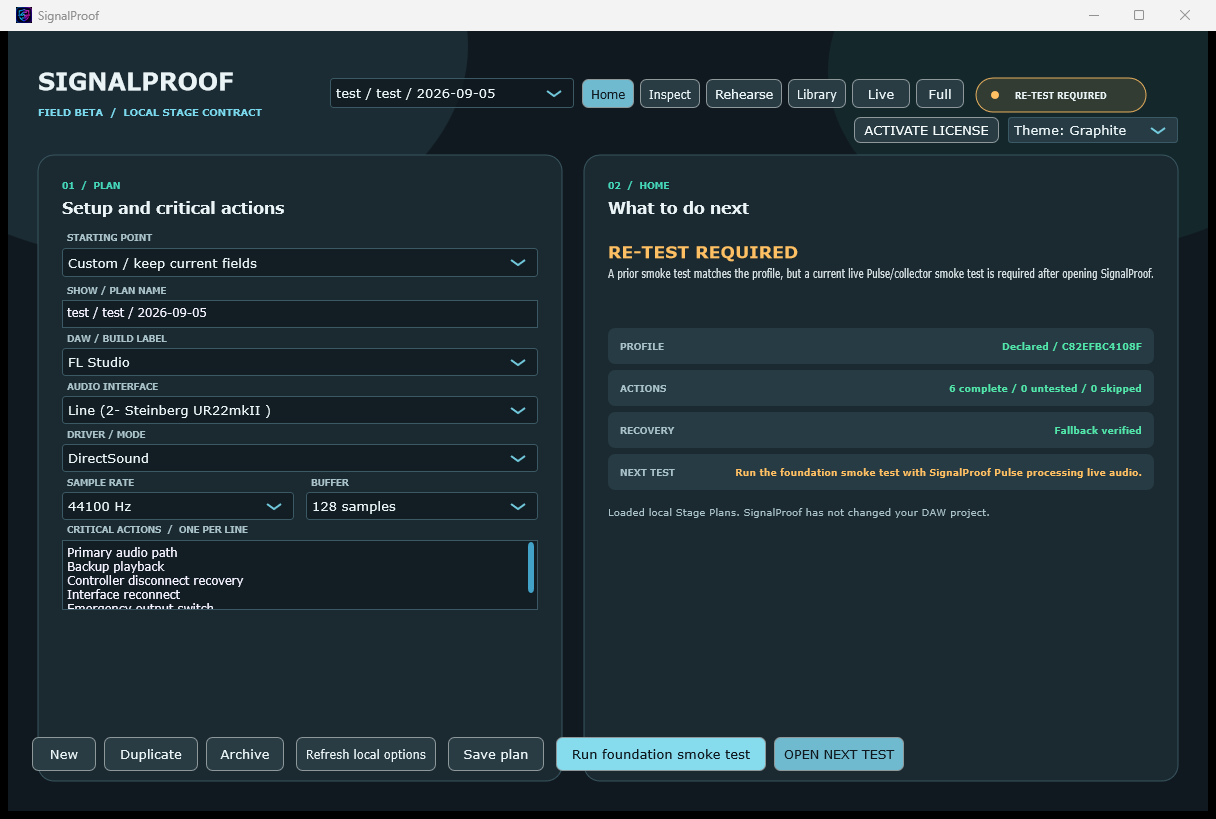
OPEN NEXT TEST opens the relevant setup or rehearsal view and focuses the next required control. It does not run a test or mark evidence complete. Live Mode requires leaving Live before opening setup or rehearsal controls.
SignalProof is a local, show-day evidence companion for live audio sessions. It helps you prove that your declared rig, critical actions, fallback media, and recovery drill have been checked. The optional Rehearse > Setlist / tools workspace can audition local fallback audio and record selected inputs or MIDI during rehearsal; Pulse remains transparent.
This guide applies to SignalProof 0.8.0 field beta.
Install or update the companion and Pulse
Use SignalProof-0.8.0-Windows-x64.msi, with its matching .sha256 sidecar.
Windows installers are provided as MSI only and install per-machine.
Update the desktop and SignalProof Pulse together, then restart/rescan the
DAW so it loads the new Pulse binary. The current bridge protocol is v2.
Saving preserves smoke evidence when an unchanged plan is saved. A real rig change, Pulse restart or stopped processing still requires a fresh smoke test. Declare the device's actual sample rate and buffer size; the host's maximum plug-in block is a separate value and is not a replacement for the device buffer. A sample-rate mismatch shows the declared and observed rates so you can correct the plan or the actual audio setup.
The public Live Passport verifier is available at https://www.egob.be/signalproof/.
The main workspace displays declared local facts and evidence status. It does not inspect DAW projects or discover their plug-in chains and scenes. Optional audio/MIDI recording is started explicitly in Rehearse > Setlist / tools; it is separate from Pulse's transparent callback evidence.
The fastest safe workflow
Use this sequence before every performance or critical session:
- Open SignalProof and create or select a Stage Plan.
- Complete the rig profile and write the critical actions you must be able to perform.
- Save the plan, then load SignalProof Pulse in a live audio path in the DAW and start audio playback.
- In SignalProof, run the foundation smoke test and confirm it is live for this desktop session.
- In Rehearse, complete every declared critical action and verify the fallback media you intend to use.
- Run and finish the manual timed recovery drill.
- Confirm the Stage Contract says READY, then generate a Live Passport for your crew hand-off.
If anything about the rig changes, treat the earlier evidence as historical and repeat the affected checks.
1. Create a Stage Plan
Open Home. Use New to create a plan, or choose an existing plan from the list. A plan is a local record of one show, set, or repeatable rig.
The DAW/build, audio interface, driver/mode, sample-rate, and buffer controls are editable dropdowns. You can always type the declared value yourself. Refresh local options adds earlier local Plan entries and read-only local audio-device suggestions; it never scans DAW projects/processes, changes an audio device/driver, or treats a suggested value as verified evidence.
Fill in these fields:
| Field | What to enter |
|---|---|
| Show / plan name | A recognizable show or session name. |
| DAW / build label | The DAW name and version/build you are actually using. Earlier local labels may be suggested; SignalProof never detects running DAWs. |
| Audio interface | The active interface or output device. Local device availability may be suggested, but you must confirm the actual device. |
| Driver / mode | The selected driver, host mode, or routing mode. A locally available audio driver type may be suggested. |
| Sample rate | The current session rate, such as 48 kHz. A selected local device may offer supported values. |
| Buffer | The current buffer setting, such as 128 samples. A selected local device may offer supported values. |
| Critical actions | One action per line: concise actions you will rehearse, such as “switch to fallback output” or “recall emergency scene.” |
Use the optional recipe fields only for your own prompts. SignalProof does not alter the DAW or run recipes automatically.
Select Save plan after changes. Use Duplicate to make a variation without changing the original, and Archive when a plan is no longer active.
Write useful critical actions
Make each action observable and short enough to complete under pressure. Good actions are specific to your show, not generic DAW features.
Examples:
- Select the prepared emergency scene on the hardware controller.
- Move the vocal path to the known-safe spare input.
- Change the monitor feed to the fallback output.
- Open the separate playback machine and cue the next fallback file.
Avoid combining several operations into one line. Separate actions give you clearer coverage and reveal what still needs rehearsal.
2. Connect the Pulse bridge and run a smoke test
SignalProof Pulse is a strict transparent VST3 bridge. It contributes no audio processing. Its purpose is only to report a live callback from a real DAW audio path to the open desktop app.
- Start the SignalProof desktop app and keep it open.
- In the DAW, rescan plug-ins if the host has not discovered SignalProof Pulse yet.
- Insert SignalProof Pulse in an active, audible audio path. It must receive live audio callbacks; putting it on an unused channel is not enough.
- Start playback or otherwise make that path active.
- Return to Home and select Run foundation smoke test.
A successful smoke test confirms, at that moment, that the saved profile is complete, at least one critical action is declared, the Pulse callback is live, and the local evidence journal is healthy. It is evidence of a current condition, not a performance measurement or a DAW certification.
The declared sample rate must match the rate Pulse receives. If it differs, the status shows RE-TEST REQUIRED and displays both rates; correct the DAW or plan setting before retesting. The Buffer field is the device buffer shown in your DAW's audio settings. A host can give Pulse a larger maximum plugin block or variable callback sizes, so those values do not verify the device buffer and need not equal it. Changing the declared buffer still invalidates the plan's evidence.
Live detection shares recent callback evidence across timer polls and button clicks. If processing stops, evidence expires within one second and the next desktop update requires a fresh smoke test. A host restart also requires a new test. Saving an unchanged plan and generating a passport preserve a valid current-session smoke result.
Understand the smoke state
| State | Meaning | What to do |
|---|---|---|
| Current live smoke | The required evidence was observed in this desktop session. | Continue to rehearsal. |
| Re-test required | A profile change or reset invalidated the current smoke. | Save the profile and run the smoke test again. |
| Unknown / missing bridge evidence | SignalProof cannot see a live Pulse callback. | Keep the desktop app open, put Pulse in a genuinely active path, and run audio. |
| Stop: local evidence unavailable | The local journal cannot be trusted or written. | Stop relying on the plan, back up the local evidence folder, correct storage/permission issues, then restart. |
Closing and reopening the desktop app starts a new evidence session. A smoke test from an earlier desktop session never carries forward as current live smoke.
3. Rehearse the show-critical actions
Open Rehearse once the smoke test is current.
- Select Start / restart rehearsal.
- Carry out each action in the real rig, not merely in your head.
- Select the matching action and mark it complete immediately afterward.
- Finish the rehearsal when every action has been completed.
Use Skipped only when you intentionally did not perform an action. A skipped, unknown, or interrupted action blocks the Stage Contract from becoming READY. Restart the rehearsal if you need a clean pass.
SignalProof logs your declared coverage. It does not operate faders, transport, controllers, session recall, routing, or external equipment on your behalf.
4. Verify fallback media and rehearse recovery
In Rehearse, add each fallback audio file that is genuinely available to you on show day. SignalProof can inspect supported local audio files (.wav, .aif, .aiff, .flac, and .mp3) and record descriptive metadata plus a content fingerprint.
- Select Add / verify fallback media and choose the actual file.
- Wait for verification to complete.
- Confirm that the listed fallback pack matches your intended contingency material.
- Before travelling or after changing storage, select Recheck all to check every saved item in sequence.
- For a moved, changed or older entry without a saved location, select its numbered entry and Locate / verify selected. This explicitly accepts the selected file as that entry’s fallback.
Recheck shows file-count and current-file progress and supports Cancel check. It clears previous file verification and the current drill before starting. Missing, changed, corrupt and unchecked files remain unverified; a changed fingerprint requires explicit selection. Rechecking never completes a rehearsal or manual drill. Original locations stay on this computer, outside shared evidence. Older entries need their file located once; identically named files in different folders remain separate.
SignalProof shows verification progress and lets you cancel safely. It checks readable metadata, a SHA-256 identity, and complete audio decoding in bounded chunks; it rejects non-finite samples, truncated RIFF containers and files that change while checked. Changing the plan or clearing its manifest invalidates an older verification result. Verification does not play or change the file. Clear fallback pack removes only SignalProof’s local reference; it never deletes the original file. For an optional listening check, open Setlist / tools.
Then run the recovery drill:
- Make the planned recovery route available in the real setup.
- Select Start manual timed drill.
- Perform your manual recovery sequence.
- Select Finish drill only after you have verified the recovery outcome yourself.
The timer records a human-run rehearsal and does not trigger playback automatically. An interrupted drill does not satisfy the READY gate. Restart and finish it after the recovery result has been checked.
5. Read the Stage Contract and generate a Live Passport
The Stage Contract is the decision surface. It becomes READY only when all of these are true in the current context:
- A current-session, live Pulse/desktop smoke is present.
- Every declared critical action is complete.
- Every selected fallback item is verified.
- The manual recovery drill was finished after recovery verification.
- The local evidence journal is healthy.
When the contract says READY, select Generate Live Passport. It writes a standalone HTML hand-off, PDF with a scannable verification QR, QR SVG, and signed JSON evidence. Generation runs in the background. Use Open Passport, QR, Save PDF, and Verify Passport to inspect the package. The latest export remains available after restarting the desktop.
The Passport includes the declared rig summary, Pulse/journal evidence, required action and fallback counts, measured recovery duration/history, Passport ID, SHA-256 fingerprint, and per-install P-256 ECDSA signature. It excludes annotations, action labels, media names, raw file paths, audio and DAW projects. A recipient can open the HTML and verify it locally in a modern browser without an account, upload, or SignalProof installation. A signature proves that evidence has not changed under its included key; it does not independently establish who made the claim. Recipients can optionally compare an expected signer fingerprint.
Open Share / options before generating to choose Redacted (show, declared rig, counts and recovery history), Technical (also local system facts), or Custom (choose whether to include the show title, rig fields, system context and history). Paths, media names and action details are excluded in every mode. Venue Request identity and required-check counts remain in request-bound responses. Existing files retain their original privacy settings; generate a new package to change what is shared.
The standalone Passport has Copy verification link, Share / AirDrop, Email Passport, Save PDF, Save evidence JSON, and Save recovery card controls. Email opens a draft in your mail app. Browser sharing depends on platform support. Desktop Save PDF opens a save dialog; browser Save PDF uses the print dialog and preserves international text.
The QR/link contains compressed signed evidence and uses the public verifier URL in Share / options. Anyone with the link can read its included fields. The default is the deployed https://www.egob.be/signalproof/. Local HTML/JSON verification remains available without hosting.
For a short hosted link, choose Share / options > Upload latest Passport to EgoB.be. Preview the exported Passport, then choose Upload. Only its signed evidence JSON is sent. Anyone holding the unlisted link can read its included fields. Hosting lasts 30 days; the original evidence expiry still applies. The link is copied after upload. Manage hosted Passports opens the hosted QR/sharing/print page, copies links, and removes older uploads. Removal stops the hosted link; downloaded copies and portable links already shared remain available to recipients.
Uploading requires an administrator-issued access key, entered in Configure EgoB.be upload access. It is protected with Windows DPAPI and never included in exported files. Forget upload access removes only the saved key on this computer. No upload runs automatically.
Passport freshness is separate from integrity. The default expiry is 24 hours after the oldest required recorded evidence, including required action and fallback verification timestamps. Share / options → Evidence validity changes that period. An expired Passport displays amber STALE — RE-RUN SIGNALPROOF. Stale does not mean unsafe and does not erase historical integrity. Pulse restarts, loss of processing evidence and observed sample-rate/buffer changes require a fresh smoke test in the desktop. Arbitrary DAW project edits cannot be observed; rehearse again after those changes.
Share / options → Show dated recovery history lists up to 24 drills. Best time and percentage change compare the same declared rig only; older records without a rig fingerprint remain visible but are excluded from comparisons. The Passport and recovery card present measured seconds, not a reliability score.
A Passport or Stage Card records the evidence state available when it was written. It is not a promise that the venue, DAW, interface, or future performance will remain stable, and its local evidence signature is not an identity certificate or venue certification.
6. Reuse approved preparation safely with the Library
Open Library for reusable local setup material.
Action templates
Save a well-written action list as an action template, then apply it to a new plan. Templates are useful for recurring emergency procedures.
Applying a template intentionally resets action coverage and the recovery drill. Rehearse the newly applied actions before relying on the Stage Contract.
Setup snapshots
Save a setup snapshot before changing a rig or when preserving a known configuration for comparison. A snapshot stores the declared setup, not the DAW state.
Restoring a snapshot resets the smoke/rehearsal/recovery validation and drill. It does not change the DAW, interface driver, routing, project, or files. Compare the restored plan carefully and re-run the current checks.
Similar Passing Profile Explorer
After a Stage Contract genuinely reaches READY, SignalProof keeps a local historical navigation record containing only the declared rig fields and action names. The Library can show the closest earlier match and list profile/action differences. Create fresh similar plan makes a new declaration only: it never copies live smoke, rehearsal marks, fallback verification, a drill, annotations, or the earlier READY result. Complete the current workflow again.
Live Mode
Select Live on show day for a high-contrast view of the current Stage Contract, Pulse state, last verified fallback, recovery-drill state, and next safe action. While it is active, plan editing, local device scans, comparison, support export, and in-flight verification are suppressed. The foundation smoke button remains available when you need to refresh the live Pulse evidence named by the dashboard; it saves only SignalProof's local evidence and never controls the DAW. Exit Live Mode before changing setup or running other checks.
Use Full (or press F11) when you need the desktop workspace to fill the display. Press Esc or F11 to return. Full screen changes presentation only; it does not alter a DAW, device, driver, routing, or audio setting.
Redacted support bundle
Use Write redacted support bundle when sharing a technical summary for support. Review the preview first. The bundle includes product/build context, anonymous plan and rig fingerprints, contract and coverage counts, and local journal health.
It deliberately excludes audio, DAW projects, raw paths, action names, media names, notes, annotations, user names, and machine names.
Venue Request
In Library, leave the Venue Request field empty and select Write Venue Request to open the full browser editor. Choose venue, stage, date, recommended recovery target, standard checks and any additional checks. Share / options → Create configurable Venue Request / verify response opens the same editor. For a quick six-check request, enter Venue | Stage | YYYY-MM-DD | target seconds in Library (target is optional, default 15). The standard checks cover primary audio, backup playback, controller disconnect, interface reconnect, emergency output switch and a complete recovery drill.
Copy the request link or download its JSON. The performer selects Open in SignalProof on the request page, or Import Venue Request in the desktop, to create a fresh Stage Plan. The request fingerprint is validated before import, but no smoke, rehearsal, fallback, drill, or READY evidence transfers. Venue, stage, date, target and all requested checks remain bound to the plan and its returned Passport. A recovery target is a recommendation and is reported as met/not met; it does not silently change READY requirements.
Complete the Stage Contract and return its Live Passport. On the original request page, load that Passport under Check a returned Passport against this request. The page verifies the signature, exact request identity/fingerprint, requested-check coverage, freshness and recovery target. Removing or renaming a requested action prevents a complete request match. A request checksum is not authentication of a venue.
Show-day checklist
Run this in order after the final rig is assembled:
- Confirm the physical interface, driver, sample rate, and buffer match the saved plan.
- Start SignalProof and open the correct Stage Plan.
- Place SignalProof Pulse in an active DAW audio path and verify actual audio activity.
- Run the foundation smoke test.
- Rehearse every critical action on the real rig.
- Verify every fallback item you will rely on.
- Finish the manual recovery drill after verifying the outcome.
- Check for READY and generate a Live Passport for the operator/venue.
- If the rig changes materially, re-run the affected process instead of treating the earlier card as current proof.
Troubleshooting
Pulse does not become live
Check that the desktop application is running and that Pulse is inserted in a path the DAW is actually processing. Start audio on that path. A bypassed, silent, disabled, frozen, unused, or non-processing path may produce no callback evidence. If the plug-in is absent from the DAW, rescan the VST3 plug-in folders and confirm the per-machine installation completed.
The Pulse editor shows PASS-THROUGH ACTIVE only while normal audio callbacks are advancing. A VST3 host that routes the plug-in through its bypass callback shows BYPASSED BY HOST; a frozen or stopped callback shows STANDBY - NO HOST PROCESSING. Neither state is live Pulse evidence.
The smoke test says re-test required
Save the complete profile, make sure at least one critical action is declared, restore live Pulse activity, and run the foundation smoke test again. A profile change, a restored snapshot, a new app session, or a reset correctly requires fresh evidence.
A fallback item will not verify
Choose a currently accessible, non-empty local file in a supported format. Do not assume a historical entry proves a moved, replaced, or unavailable file is still usable. SignalProof records metadata and a fingerprint only; it does not repair media or locate missing files.
The Stage Contract does not say READY
Read the individual gate statuses on Rehearse. The usual causes are a missing current live smoke, an incomplete or skipped action, an unverified fallback item, an interrupted/unstarted drill, or an unhealthy local journal. Complete or repeat the affected work; do not bypass the gate.
SignalProof reports local evidence trouble
Do not hand-edit the journal or its JSON files. Close SignalProof, make a backup copy of %APPDATA%\\EgoB\\SignalProof, check available disk space and write permissions, then restart. If the journal remains unavailable, do not use that plan as evidence until the storage problem is resolved.
Local data, privacy, and removal
SignalProof is local-first. Its evidence, Stage Cards, templates, snapshots, journal, and support bundles are stored under:
%APPDATA%\\EgoB\\SignalProof
The desktop app and VST3 bridge do not require a cloud account or background network service for this workflow. Keep normal backups of your own DAW project, media, and SignalProof data as appropriate for the show.
Uninstalling SignalProof intentionally leaves this local evidence folder, your DAW project, and your media in place. Remove the evidence folder only if you explicitly no longer need it.
Product limits
SignalProof is field-beta preparation software, not a safety system, performance meter, crash predictor, venue certification, or substitute for a show operator. It cannot guarantee that a DAW, plug-in, interface, driver, controller, OS, or media device will work under future conditions.
Use the Stage Contract as an honest record of what was checked, and keep a human operator responsible for the live system.
Interface appearance
Use the Theme selector near the top of the window to choose Original, Graphite (charcoal panels and teal accents), or Copper (warm brown panels and amber accents). The choice is remembered for this app on this computer. It changes only the interface; audio, saved projects, and rendered visual colours keep their existing settings.