How to use Nylonize 1.26.2
Launch price on release: €59
Activate your license
Open ACTIVATE LICENSE in the app or VST3 and paste the license key from your Lemon Squeezy receipt. Activation requires internet access and unlocks conversion, playback and WAV/MIDI export. Loading, analysis and project editing remain available before activation.
Standalone and VST3 share activation within the same Windows account. Connect at least once every 30 days. To move an activation, open the license window and choose DEACTIVATE COMPUTER while online. Use CHECK LICENSE to validate again. Your key is stored encrypted on this computer and is never saved in a DAW project.
Coming soon. Nylonize is not yet available to purchase. Preview the workflow and installation guide below.
Guide contents
- Install and load a recording
- Lazy guitar mode
- Gesture adaptation
- Acoustic design
- Result MIDI editor
- Earlier conversion improvements
- Editing and guitarist controls
- Auto settings and workspace
- Projects and performance editing
- Choose the acoustic sound
- Optional unplugged arrangements
- Compare and choose the duration
- Export and continue in a DAW
- Troubleshooting and validation limits
- Interface appearance
- Gesture adaptation and current limits
- Acoustic design controls and limits
- Instrument adaptation
- macOS installation and feature scope
Nylonize compatibility
| Requirement | Windows | macOS |
|---|---|---|
| Current version | 1.26.2 | 1.26.2 |
| VST3 | Yes | Yes |
| Audio Unit (Logic Pro) | — | Yes |
| Standalone | Yes | Yes |
| Processor | x64 | Apple silicon (arm64) |
| Minimum OS | Not specified | macOS 14.0 |
| Installer signing | Yes | Developer ID |
| Apple notarization | — | Yes |
Intel Macs are not supported. See the installation guide for feature differences and host requirements.
macOS installation · 1.26.2
Apple silicon (arm64), macOS 14 or newer; Intel Macs are not supported. Mac installer: Nylonize-1.26.2-macOS.pkg. Windows installer: Nylonize-1.26.2-Windows-x64.msi. Use your private purchase-download link for the current installer and SHA-256 checksum. The Mac PKG and its app, VST3 and Audio Unit bundles are Developer ID signed. Apple notarized the installer, and its ticket is stapled.
- Save your work and quit Nylonize and any DAW using its plug-ins. Compare the downloaded PKG with its matching
.sha256file. - Double-click
Nylonize-1.26.2-macOS.pkg, follow the macOS Installer steps and authenticate as an administrator when asked. There is no ZIP extraction orinstall.commandstep. - The installer places
Nylonize.appin/Applications,Nylonize.vst3in/Library/Audio/Plug-Ins/VST3, andNylonize.componentin/Library/Audio/Plug-Ins/Components. Installation notes and activation help are in/Library/Application Support/EgoB/Nylonize/. - If you previously installed a Mac ZIP, remove that product’s old copies from
~/Library/Audio/Plug-Ins/VST3and~/Library/Audio/Plug-Ins/Componentsafter checking the new system copies. A DAW may otherwise load the older per-user plug-in. Restart and rescan the DAW. - Open the app from
/Applications. Enter the product’s receipt key in ACTIVATE LICENSE when applicable; installation does not activate a license. Saved projects, preferences and existing activation data are preserved.
To uninstall, quit the app and affected DAWs, then remove this product’s app, VST3 and Audio Unit bundles from the three system locations above. On Windows, use Installed apps. A normal first-open confirmation or audio-input permission prompt may still appear on Mac. If macOS says the publisher cannot be verified, check that you have this current notarized PKG and its matching checksum; contact info@egob.be if the warning persists.
Mac feature scope: The Mac build uses the legacy spectral analyzer. Basic Pitch/ONNX transcription, MP3 export and Windows Media Foundation encoder-delay correction are Windows-only. Keep the bundled guitar models with the app. Analyze stops for settings review; press NYLONIZE explicitly to convert. Native license protocol and Keychain tests passed; live-key acceptance and individual DAWs have not been validated.
Activate on Mac: Enter the product key from your Lemon Squeezy receipt in ACTIVATE or ACTIVATE LICENSE. The same product key works on Windows and Mac; a separate computer or OS account uses its own activation slot. Standalone and VST3 share the login Keychain item. If a new DAW needs Keychain access, use CHECK LICENSE and approve the macOS prompt. Keep the login Keychain unlocked. Successful validation allows up to 30 days offline, subject to key expiry. Use DEACTIVATE COMPUTER online before moving an activation; uninstalling does not release a slot.
Logic Pro: Audio Unit installation
Restart Logic Pro after installing the PKG. Load Nylonize as an Audio FX plug-in on an audio track through its Audio Unit. The included AU was validated before final Developer ID signing; individual Logic sessions and audio acceptance have not been repeated for this PKG.
Review progress: after NEXT UNCERTAIN NOTE, press MARK REVIEWED to skip that event and advance. The event heading shows how many uncertain notes remain. Marks are saved with the analysis and reset when it changes. They do not alter confidence or notes; conversion still requires NYLONIZE.
Result MIDI includes exact pitch, start, length and velocity fields plus selection stretch. Delete, resize, join, merge and undo share the grid, acoustic result and exported MIDI. Auto retains manual edits on reconversion and suggests relevant Unplugged, Project & Performance and Acoustic Lab settings for review.
Nylonize reconstructs a recorded electric-guitar performance on an acoustic instrument. Analysis runs offline; the VST3 does not convert a live input bus.
The current engine connects validated same-string legato without restarting the recorded attack. Style previews show their exact changes and keep one reversible starting point while you compare recipes or amounts. See acoustic realism and instrument qualification.
Processing retains cancellation and recovery from processing/export failures. A failed export keeps the previous file at that destination. Read the error, correct the cause and retry; wait for completion before using the new file. Analysis alone never starts conversion. Analyze stops for settings review before you explicitly press NYLONIZE.
Start here | Lazy mode | Auto and settings review | Export | Themes | Planned releases
Host loading and recall (1.26.2)
Use an instrument track and load an audio file into Nylonize. The VST3 declares a MIDI input for host compatibility, but notes/controllers do not play or change the instrument. It does not process live guitar input.
When reopening a DAW session, source loading runs in the background. Cancel is available; newer restores replace older requests. If the source is missing or changed, the message explains the failure and previous audio remains available. Use LOAD to locate a moved source; this starts a new analysis. Review tuning/capo, press ANALYZE, review settings, then explicitly NYLONIZE. Source recall never starts conversion. SAVE PROJECT / OPEN PROJECT retain exact edited performances; DAW state currently recalls source, settings and physical destination.
Install and load a recording
The Windows 1.26.2 installer includes local polyphonic transcription, the recorded acoustic catalog, Lazy mode and three selectable interface themes. Building the installer does not update an already installed application; run the new MSI to upgrade it.
Use Nylonize-1.26.2-Windows-x64.msi, with its adjacent .sha256 file. Close
Nylonize and any host using it before upgrading. The default machine paths are
C:\Program Files\EgoB\Nylonize and
C:\Program Files\Common Files\VST3\Nylonize.vst3.
- Open the Standalone, or load the VST3 on an instrument/output track.
- Drop a WAV, AIFF, MP3 or FLAC file onto the editor. Keep the original file available so you can compare results and try another conversion.
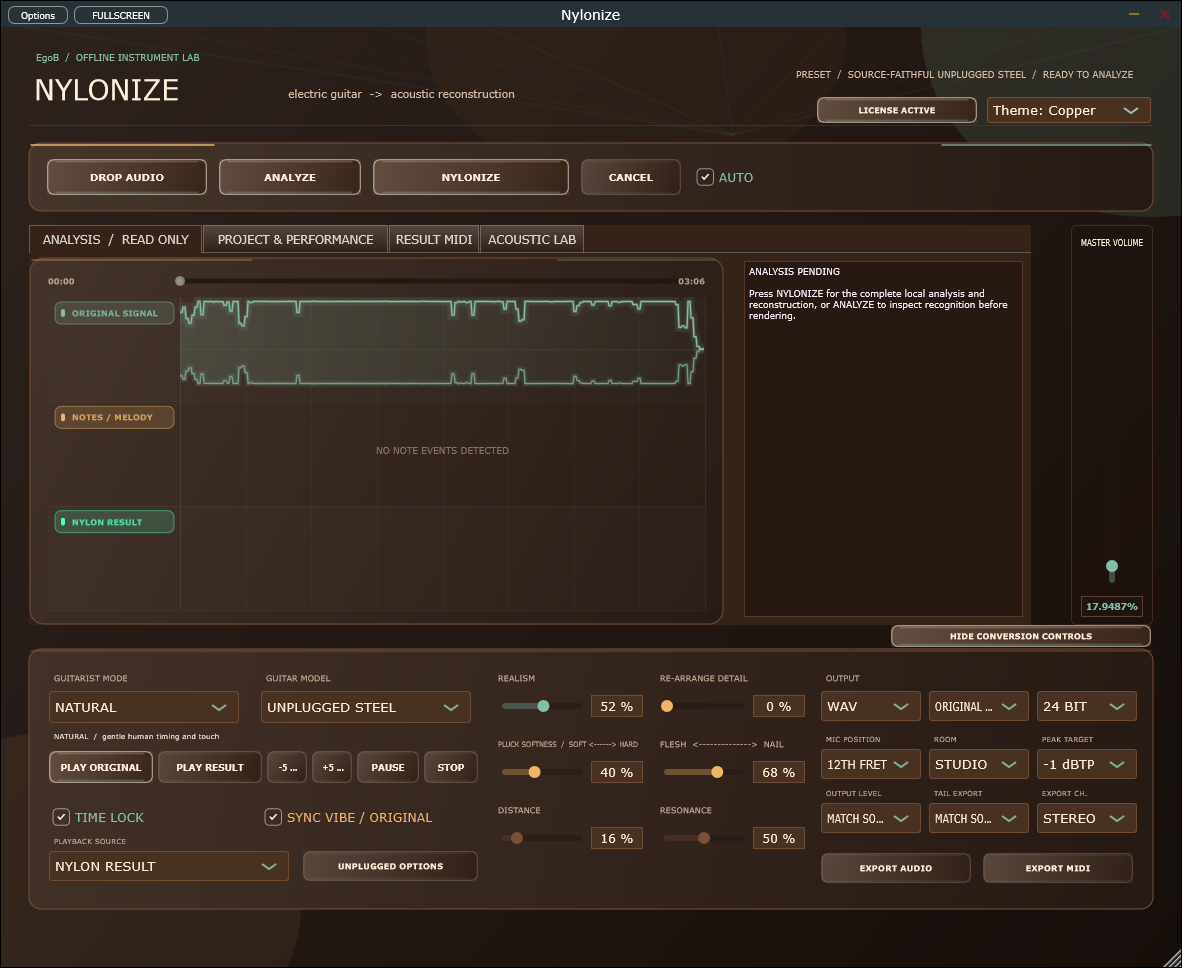
- Press ANALYZE. With AUTO checked, the app recommends settings and stops for review. Inspect the detected notes/chords and Acoustic Lab advice.
- Review the instrument, guitarist mode and sound controls. For a sparse classical interpretation, choose a nylon model and Lazy after analysis.
- Press NYLONIZE explicitly to convert. If you press it before analysis, the app analyzes and stops; review the settings and press it again.
- Compare Original and Result before exporting. Once a result exists, sound changes can rerender it; wait for the latest render to finish.
Lazy guitar mode
After Analyze, choose LAZY in GUITARIST MODE, select your acoustic instrument (for example CLASSICAL NYLON), review settings and press NYLONIZE. Lazy plays only the bare minimum derived melody: one voice, without chord accompaniment, redundant repicks or weak passing notes. It keeps essential pitch changes and expressive melody motion. Chord-only passages use a supported upper voice. Sparse melodies may already need every note.
With Time Lock on, retained attacks stay at their source positions. Unmuted strings may ring through omitted repicks, bounded by same-pitch source activity; real rests and deliberate mutes remain. Time Lock off permits the usual gentle timing variation. This is a deterministic musical heuristic; compare A/B to judge whether it retains your particular song's hook.
Result audio and exported result MIDI use the same simplified performance. Original analysis stays available. Manual MIDI note edits supply the melody input and are reduced too; the full edits remain saved for other modes. Chord-expansion options and the source-preservation blend are bypassed in Lazy. Acoustic Lab reports how many notes were removed. Auto still stops for review and never starts conversion on its own.
Gesture adaptation
Choose UNPLUGGED ADAPT, open ACOUSTIC LAB, and review Adapt amount, Natural accent contrast and Natural sustain decay (new-session starting points: 0.65). Adapt amount limits the two natural controls per gesture; zero bypasses these additions. Clean or uncertain passages stay unchanged. These controls do not add notes, change key or quantize the player. Existing explicit voicing options are separate. Faithful bypasses the new adaptation controls.
Analyze stops for review. Press NYLONIZE to convert, or UPDATE RESULT to hear subsequent Lab changes. SAVE DECISIONS exports a CSV with note timing, pitch, string, attack/continuation and the reason for each decision. Manual MIDI notes/curves take priority; old saved sessions start with these new controls at zero. Auto resets them to the reviewable recommended values.
See gesture adaptation and current limits.
Acoustic design
After Analyze, review the recommendations in ACOUSTIC LAB, then press NYLONIZE. Auto confidence blending preserves uncertain performance details through an acoustically transformed source layer. Clean, confident regions stay reconstructed. Use Reconstruction only for a fully synthesized result.
Choose the input character before analysis if known; after changing it or Source compensation, Analyze again. Body families, top controls, the morph pad and bus levels change the acoustic result. Press UPDATE RESULT to audition Lab changes after the first conversion. Your microphone/body IR must be a WAV/AIFF impulse up to 0.5 seconds; load it and raise Mic IR mix.
Manual note/pitch corrections and creative rearrangements disable source preservation so the original cannot bypass your edits. Banjo and ukulele always use their destination reconstruction. MIDI describes reconstructed notes, not every detail in the preservation waveform.
See the full acoustic design guide for controls and limits.
Low-tuned guitars and fast picking
The current detector includes low B, Drop C and Drop D. Choose a compatible destination tuning for low-tuned playback. Closely spaced picks in high-gain recordings require agreement between a decoded root onset and renewed waveform energy; effect repeats alone do not qualify.
Analyze and Auto still stop for settings review. Press NYLONIZE explicitly to convert. Review uncertain notes and compare the original before exporting; representative metal recordings and owner listening remain part of validation.
Result MIDI editor
Analyze, review your settings and press NYLONIZE, then open RESULT MIDI. The piano roll shows the generated acoustic notes. Scroll and use the zoom slider or FIT to inspect a phrase or the whole song.
- Choose MOVE, then drag a note's body vertically to change pitch or horizontally to move it. The cursor shows whether you will move or resize.
- Choose RESIZE, then drag anywhere on a note to the right to extend it, or left to shorten it. Start and pitch stay fixed, including for tiny notes. In MOVE mode, dragging the right edge of a wider note or Alt-dragging also changes length. Alt+Left/Right shortens/extends selected notes in steps. Snap aligns a resized note's end to the grid; moving vertically alone keeps its original onset.
- Drag a box from empty grid space to select a group. Ctrl/Shift-click adds or removes individual notes; Ctrl/Shift-drag adds a box to the selection. Dragging a selected group moves or resizes it together. Click a selected note without dragging to return to a single selection. F / FOCUS SELECTION zooms into the selected phrase; FIT returns to the full song.
- Double-click empty space to add a note. ADD NOTE adds C4 at the preview position. Select a note and press DELETE (or the Delete key) to remove it.
- Arrow keys move a selected note by a semitone or 10 ms. Shift+Up/Down moves an octave. Snap 1/16 uses the analyzed tempo for horizontal edits.
- CENTER NOTE corrects the selected note's fractional pitch bias. Whole MIDI notes without pitch motion are already centered and stay unchanged.
- SELECT ALL or Ctrl+A selects all result notes, including off-screen notes. Delete, Center Note, dragging, resizing and arrow keys apply to the group. Timing and pitch intervals stay relative. Escape clears selection; clicking empty space also clears it. Undo restores a deleted group.
- UNDO, REDO and RESET EDITS undo changes or return to the generated arrangement. Undo history holds the latest 24 changes during the session.
- GLUE combines touching notes of the same pitch into a single continuous note. Select the notes to glue, or clear selection to process the whole roll. It keeps the first note's attack and velocity, preserves pitch motion, and supports UNDO/REDO. Gaps, overlaps and conflicting locked strings stay separate; the Maximum gap slider does not affect GLUE.
- MERGE SAME reduces each matching-pitch chain to one long note. It uses selected notes, or all notes if none are selected. Whole roll explicitly processes every note regardless of selection. The first attack/velocity and final release remain; later re-picks disappear. Different pitches, excluded echoes/resonances and conflicting locked strings remain separate.
- Bridge rests is on by default for strong manual reduction with MERGE SAME. Merged notes sustain across those rests. Turn it off to limit bridged silence with Maximum gap (0-5000 ms; default 250 ms). This setting never changes JOIN or GLUE. Undo restores the entire batch.
- The persistent note counter updates with every edit and selection. JOIN and MERGE SAME show the before/after count, number removed and reduction percentage immediately; the piano roll updates before background audio regeneration. If instrument validation rejects the edit, the prior notes and count return with an explanation.
Gesture editing
- SPLIT: click inside a note. Each piece retains its portion of the pitch curve. The right piece starts as Legato; select Pick and click MARK if the guitarist made a fresh attack. Leave at least 10 ms on each side.
- JOIN: connects compatible same-pitch fragments or continuous legato pitch curves, retaining absolute pitch. Select All processes each compatible group and leaves unrelated notes unchanged. Gaps must fit both Maximum gap and a 30 ms limit; Bridge rests cannot override this. Different pitches need a connected legato/slide and matching pitch-curve endpoints (within 25 cents). Small release-tail overlaps (up to 25 ms and a quarter of the shorter note) are trimmed at the next onset. Separate physical strings, ambiguous chord voices, excluded notes, explicitly marked picks, discontinuous pitch curves and pitch spans beyond the two-octave editing range stay separate. Pitch corrections are baked into joined curves once, so they are not applied twice.
- CURVE: click and drag inside a note to draw pitch. Horizontal position is time; vertical position is pitch. The current corrected curve is the starting point. Drawing resets that note's local dials to zero and gives it local overrides, so the global dials do not erase your drawing. Undo restores it.
- SET OWNER: choose the intended note anchor for one selected gesture. This rebases its pitch curve while keeping absolute pitch unchanged. Use MOVE to transpose the sound. The inspector shows the owner and a descriptive classification of the available pitch motion; it is not a certainty score.
- MARK: choose Pick, Legato, Bend, Slide, Echo, Resonance or Automatic, then apply it to the selected notes. Pick uses a fresh attack; Legato/Slide use the sampled renderer's softer connected articulation. Bend/Slide use existing or drawn pitch curves. They do not invent missing pitch motion. Echo/Resonance stay visible in grey for correction but are excluded from acoustic/MIDI output. Automatic returns to the note's inferred articulation.
- REPAIR: apply evidence-assisted joins and splits to selected notes, or all notes if none are selected. Joining needs one plausible string, no fresh pick, and positively measured pitch continuity across a short gap. Splitting needs a strong measured pick inside an isolated monophonic span. Explicit gesture marks, uncertain voices, clear re-picks and unsupported silence remain unchanged. The batch can be undone. This edits the result after conversion; it does not silently change Analyze or automatically run on every conversion.
- ANNOTATIONS: export the result edits as JSON with source/analysis hashes and a result-note XML snapshot. It contains no source path or audio. Projects also save these fields normally. These are review annotations, not certified ground truth or a replacement for listening-based regression checks.
The three global dials start at 0%, preserving the performance:
| Dial | Effect at higher values |
|---|---|
| Center | Moves fractional tuning bias toward the nearest chromatic semitone. It does not choose a new song key. |
| Variation | Reduces fast pitch fluctuations and vibrato around the slower bend/slide contour. |
| Transition | Accelerates existing connected-note entrance motion, up to an almost immediate transition at 100%. Separate picks and rests stay separate. |
The turquoise line and fractional note-block positions preview pitch correction while you drag a dial. Audio updates after release. Deletion disappears from the grid immediately while the saved edit is validated; an invalid edit restores the previous notes with an explanation. All three dials are enabled after analysis. By default they apply globally. Check Selected notes to give the selection its own settings. Local overrides remain intact when you later edit global values. Select All with Selected notes checked applies local settings to every note. RESET EDITS clears overrides; NYLONIZE retains them, including when Auto is enabled. Notes without pitch curves are already centered MIDI pitches and remain unchanged; the dials do not invent vibrato or slides. This is an editor for reconstructed note performances, not a general vocal/audio tuner.
TIME LOCK is available in every guitarist mode, including Faithful and Unplugged Adapt. Keep it on for source timing. Turn it off to allow gentle timing variation with Realism; reconstructed polyphonic voices share a smooth timing adjustment of at most 12 ms, retaining simultaneous notes and event order. Manually edited MIDI notes keep their authored positions with either setting.
With AUTO checked, Analyze also recommends these values for review. Clear stable tuning bias gets gentle Center correction; very rapid small fluctuations may receive 20% Variation; small slow connected-note entrances may receive 15% Transition. Ambiguous input, wide bends and apparent expressive vibrato retain original motion. With no usable pitch evidence, the recommendation is 0%. These are conservative starting points to audition, not an automatic guarantee of the best sound. The first NYLONIZE after Analyze preserves your reviewed values. Every later NYLONIZE also keeps your edited notes and pitch dials, including with Auto checked. RESET EDITS deliberately discards those edits and restores the generated plan. The destination instrument, mode, tuning and source corrections stay as selected. Project recall and ordinary rerenders retain the same MIDI edits.
Use the result-note inspector for precise edits: select one note, enter its Pitch (MIDI), Start (s) and Length (s), then press APPLY NOTE. For a group, pitch/start/length changes are relative to the active note: transposition preserves intervals, time shifts preserve spacing, and length changes apply the same delta to each selected note. The whole edit is rejected if any selected note leaves the recording or allowed pitch/duration range. Velocity (1-127) applies to every selected note; each note's lower white bar shows its velocity. Select a group, enter Stretch (%) and press STRETCH to scale its lengths and gaps around the earliest selected onset. Pitch curves follow the stretch, unselected notes stay unchanged, and Undo reverses the edit. Edits outside the recording or incompatible with the instrument are rejected with an explanation and the previous performance is retained.
After a result exists, edits rerender its acoustic sound. Export MIDI uses the same corrected notes and pitch curves. Pitch bends use separate channels per physical string and a +/-24-semitone range; the receiving instrument must honor the MIDI pitch-bend setup. Invalid string/fret combinations are rejected with an explanation and the previous result is kept.
Save from PROJECT & PERFORMANCE > PROJECT > Save project as to retain result
edits and dials in a .nylonize project. Opening a project restores the editable
notes but waits for NYLONIZE before rendering. Source analysis remains
separate; explicit re-analysis or source-note/tuning correction clears downstream
result edits. Changing arrangement controls after manual result-note edits keeps
those edited notes; use RESET EDITS to generate a different arrangement.
Earlier conversion improvements
earlier releases banjo voicing: If a crowded transcription cannot fit Banjo (6-string), choose Unplugged Adapt, Reimagine or Pro with capo 0, review your settings and press NYLONIZE. The renderer can place necessary chord tones in another octave without changing the key or detected source notes. The adapted-voicing count includes those moves. Exact/Naturalize, capo pitches and manually locked strings retain strict validation. More than six simultaneous voices still need correction. Earlier versions applied this repair only in Reimagine/Pro. Hover over a clipped status message to read its complete text.
earlier releases phrase interpretation: Press Analyze to interpret contrasting passages separately. Open PROJECT & PERFORMANCE: its analysis report shows timed acoustic intentions, rests, measured pulse/accent patterns and supporting style context. Review settings, tuning and capo, then press NYLONIZE. Existing projects retain their saved performance until you analyze again. These estimates can be mistaken; use source/result playback and event corrections to review difficult passages.
earlier releases gesture repair: Press Analyze again on an older performance to use the new dense-region attack rules, connected lead tracking and fast-repick recovery. Review the proposed settings, then press NYLONIZE. Opening an older project keeps its measured notes and edits. The supplied-song comparison has 15-second review sections; waveform scores do not certify acoustic realism.
earlier releases clean-note recovery: Re-analyze a source to use the corrected pick evidence and recovered-note dynamics. Analyze stops for review; press NYLONIZE when ready. Existing projects keep their measured notes and corrections.
September 12 fidelity revision: Enable Sync Vibe to follow the source loudness and accents more closely. New analyses also preserve strong short picks, avoid unintended pitch rearrangement and keep bends on their original notes. Previously saved performances retain their notes and edits; press Analyze when you want a new analysis. Local dynamics following is bypassed when rendering manual corrections or a possible mixed-source recording.
Editing and guitarist controls
Open PROJECT & PERFORMANCE after analysis. Use FIND EVENT to fill the note fields. ADD NOTE prepares a user-owned note; adjust its pitch, timing and reason, then press APPLY. Enter comma-separated event IDs to edit a chord/group: pitch and onset changes are relative to the first note, duration scales the group, and velocity applies to every selected note. Strum direction and spread can redistribute the selected onsets. UNDO/REDO treats the group as one edit, including after reopening the project. Source detector evidence remains separate from user additions.
Select Standard E, Drop D, D standard, Drop C, Open G, Open D, Baritone B or six custom base open-string MIDI pitches. Select Capo 0–12, then SET TUNING. This changes fingering and invalidates the previous render; it does not transpose detected pitches. The base tuning describes the strings before the capo. PLAN CAPO checks positions against the current performance and fills a proposal; review it and press SET TUNING to apply. Planning does not convert audio or change the key. The planner prefers open strings and less fret movement while preserving held notes. It may recommend no capo or find no playable position.
Capo 2 on Standard E sounds F#2/B2/E3/A3/C#4/F#4 on its open strings. A detected E2 is then below range and the destination is rejected; it is never moved up an octave automatically. The physical neck ends at fret 24, so capo 2 leaves relative frets 0–22. The report shows the destination range and the fretboard uses frets relative to the capo. Audio and MIDI retain concert pitches. Projects and host sessions save base tuning and capo separately; Auto and re-analysis retain that destination. Older projects open with capo 0.
Tenor ukulele retains G4/C4/E4/A4 and requires capo 0. String overrides must be playable in the chosen tuning. The virtual instrument uses rendered string positions where available and displays pitch trajectories; Reduced motion disables smooth pitch animation while continuing to update sounding notes at the playhead.
FIND EVENT also explains the selected note's pitch evidence, attack or continuation status, and pitch-compatible string/fret alternatives in your tuning. These positions are estimates. Explicit string corrections remain identified as yours; APPLY checks the complete fingering and rejects an impossible chord stretch without replacing your current performance.
The analysis report includes waveform attack recall/precision, sustain coverage, hard dropout duration, local dynamics correlation and spectral measurements. The Windows polyphonic renderer now supplies these ownership and dynamics measurements too. A CHECK location tells you where to compare Original and Result. A passing ownership check describes the detector's evidence; it does not replace annotated reference or listening review. Dynamics counts a source gesture once, even when several strings belong to the same chord.
Shift-drag the main timeline to select IN/OUT, or type exact times in the workflow panel. Choose sample, beat or nearby quiet-point snapping before SET RANGE. Range values preserve sample precision. Original and Result use the same range; loop playback applies short edge fades. Analysis still processes the full source, and range export starts at zero.
Choose a Guitarist re-performance style and amount, then PREVIEW STYLE. These eight local starting points use the existing acoustic interpreter; they do not imitate a particular player or infer a new genre rhythm. MAKE IT BEAUTIFUL makes bounded changes to softness, nail/flesh and mic distance. Detailed controls remain editable; REVERT restores the affected controls and renders them again. Source evidence, instrument choice, corrections and output/export settings remain under your control. Audition to decide whether the change suits the recording. The report lists exact before/after percentages. Repeated previews and amount/style changes share one saved starting point, so they do not accumulate. Style tone changes stay within 35 percentage points, realism within 20, and Make it beautiful within 15; the amount scales these bounds. Revert restores all touched controls to that starting point, including any you subsequently edited manually. Before the first result, Preview prepares settings and waits for your explicit NYLONIZE action.
SETUP checks the selected bank's manifest and samples in a background job. APPLY SETUP changes only decode-read size; REVERT SETUP restores it. Changing source/device/model/range invalidates the check. SAVE SUPPORT REPORT shows the exact local report before saving; it contains no audio, musical events, project names or source paths.
Auto settings and workspace
Check AUTO, then click ANALYZE. Review or adjust the recommendations, then press NYLONIZE to convert. Analyze never starts conversion. If you press NYLONIZE before analysis, the app first analyzes and stops for review; press NYLONIZE again when the settings are ready. Auto selects the guitarist mode, Unplugged Steel or Fingerstyle based on analysis, realism, pluck/nail, microphone and room settings, source timing and dynamics. Relevant Unplugged options follow measured bends and independently supported power-chord harmony. Output becomes WAV at the original sample rate, 24-bit stereo, Match Source level/length, -1 dBTP and 100% monitoring. Manual tempo/key overrides clear; unsupported arrangement options remain off. You can adjust every recommendation before NYLONIZE.
From earlier releases, Auto uses Faithful for ambiguous input, Unplugged Adapt for driven rhythm, and Natural otherwise. Fingerstyle recordings use the Fingerstyle nylon bank unless the source is high gain; other sources use Unplugged Steel. These are editable starting recommendations; audition the result for your recording.
After a conversion, changing the model, mode, tone, timing, dynamics or rendered output settings automatically starts nylonization again, with the progress animation. Rapid edits are combined into one request and the latest settings win. Model and mode choices remain yours while Auto is checked, including edits made during analysis. Clicking NYLONIZE uses the settings you reviewed, including your manual adjustments. Applied note corrections, undo/redo and tuning changes also reconstruct the result. Monitoring volume, playback range and file format/rate/depth take effect without reconstructing the sound. Export becomes available when the fresh result is ready.
From earlier releases, Match Source level compares frequency-weighted loudness. The selected peak ceiling still limits the gain; Manual remains available for your preferred level. Analyze older recordings again to recover the notes addressed by the earlier releases gap repair.
Project & Performance retains your source range, loop, tuning and capo. Clear fingerstyle/strummed passages receive modest Fingerstyle/Folk preview settings; uncertain material uses Source faithful (Auto). Measured strum spread and consistent direction populate the correction controls. These are suggestions: use Preview Style or Apply to commit them. The first detected note fills the inspector. Explicit re-analysis replaces detection and clears note corrections. Acoustic Lab recommends touch, sustain, dynamics, top/body and room settings; input calibration and your chosen microphone IR are preserved.
Manual adjustments remain available afterward. Auto offers new recommendations on the next successful ANALYZE, then stops for review again. Explicit Auto re-NYLONIZE retains result MIDI edits and pitch dials. Before conversion, changing a knob or instrument only edits the settings. Projects remember Auto and settings.
With Acoustic voicing expansion enabled in Unplugged Adapt or Reimagine, supported sevenths, suspensions and extensions now take priority over another doubled fifth. Common tones prefer their previous strings when the next voicing remains playable. Sustain strums still require Reimagine and a stable local source pulse; echoes and irregular phrases do not supply that pulse. These creative additions remain separate from the detected performance.
Click HIDE CONVERSION CONTROLS above the bottom panel to expand the upper workspace. SHOW CONVERSION CONTROLS stays available to restore it. Collapsing preserves settings and playback and is remembered when reopening the editor. The performance form becomes compact when needed; smaller windows retain scrolling.
TENOR UKULELE uses separate recorded ukulele samples. Guitar notes outside its range move by octaves, and crowded chords reduce to at most four distinct tones. The analysis report shows adapted voicings and the selected sample bank; the rendered MIDI follows the audible ukulele voicing.
Projects and performance editing
Open PROJECT & PERFORMANCE. PROJECT provides Open, Save As, Relink, recent projects and recovery snapshots. An asterisk means there are unsaved source, parameter, range or correction changes. Saving a project retains its source path and identity; retain the recording with the project. If it moves, Relink accepts the same decoded recording at its new location.
Enter source IN/OUT in seconds and press SET RANGE. 0 / 0 selects the whole
file. Enable Loop phrase to audition the range. Analysis currently uses the
complete recording; audio/MIDI exports trim to the range and begin at zero.
Enter an event ID from the report and press FIND EVENT. Edit pitch, onset, duration, velocity, articulation or removal, add a reason, then APPLY. NEXT UNCERTAIN NOTE selects the next event with pitch evidence below 0.85, shows its evidence in the inspector, and loops the original audio with half a second of context on each side. It visits events in time order and wraps to the first candidate. Confidence is detector evidence, not a probability of correctness. This temporary audition keeps the saved source/export range unchanged. STOP ends playback; starting normal playback restores the saved range. Use the existing correction fields and APPLY to edit the selected event. UNDO/REDO restore the correction history. Press NYLONIZE again to hear the corrected performance. The source audio and detected baseline remain intact.
PREPARE WAV/MIDI writes a fixed export snapshot in a background job. Once DRAG READY FILE enables, drag it into the DAW. Use normal Save/Import if the host does not accept file drops. SETUP shows local device, memory, timing, asset and storage advice. It does not change musical or device settings.
The fretboard and tuning/confidence report show estimates. Banjo is specifically a six-string guitar banjo. Tenor Ukulele uses four re-entrant strings, adapts out-of-range notes by octaves and reduces crowded chords to playable voicings. Existing nylon voices remain derivatives of one recorded classical guitar; they are not separately sampled instruments.
Nylonize analyzes a complete guitar recording and reconstructs an acoustic performance offline. The Standalone and VST3 do not convert an incoming DAW audio bus in real time.
Choose the acoustic sound
Choose Faithful, Natural, Reimagine, Pro, Unplugged Adapt or Lazy, then select an acoustic model. Unplugged Steel is the default. The catalog contains eight calibrated nylon voicings, Unplugged Steel, Banjo (6-string) and Tenor Ukulele. See instrument adaptation for tuning and range rules.
After your first explicit conversion, a sound-setting change rebuilds the result. Let the render finish before judging it. Use the Attack/String/Body tone controls to shape the result; the direct string path now runs in parallel with the body low-pass so body softening does not remove all string detail.
The Windows x64 development build now uses a bundled Basic Pitch model to
estimate overlapping notes, then plays the selected recorded acoustic guitar.
The analysis report says POLYPHONIC TRANSCRIPTION when this path is active.
Keep the adjacent Assets folder with the executable. Analysis runs locally;
no Python installation, cloud account or audio upload is required.
This path preserves the estimated onset times and lets the acoustic recordings decay. It does not fill quiet passages with the previous guessed root/chord sustain layer. Acoustic Lab can blend an acoustically transformed source layer where its preservation checks permit; Lazy and manual result edits bypass that blend. The model can still miss soft chord tones, add harmonic notes or misread heavily effected passages; compare the result with the original before using it in a production.
Other platforms and explicit legacy test configurations retain the spectral analyzer. The report identifies that path. The BPM and Key/Override controls remain removed from the editor.
Optional unplugged arrangements
Unplugged Adapt preserves source attacks, swing, pushes/pulls and phrase placement while interpreting the part on an acoustic guitar. Time Lock defaults to on; explicitly disabling it permits gentle timing variation. Melodies, riffs, chord-top notes and bass notes keep their pitches; eligible inner chord voices can move by octaves to more practical string/fret positions. It does not quantize or introduce a strumming pattern.
In this mode, normal picks, fingerstyle, strums, palm mutes, dead strings, compressed sustains, stable feedback-like tones, legato and rapid picking receive different acoustic excitation, damping and release behavior. The performance model stores attack, local/phrase levels, accent ratios and decay/release curves. The Windows polyphonic renderer retains measured attack levels and physical damping while allowing the recorded strings to decay naturally. These are evidence-based interpretations, not certain identifications of every electric technique.
Open UNPLUGGED OPTIONS to enable Acoustic voicing expansion. Enable No bass instrument as well for a guitar/drums/vocals arrangement that needs additional low-root support. Expansion adds playable chord strings at existing source attacks. It only adds a major/minor third when independently observed harmonic evidence supports it; otherwise a power chord keeps its root/fifth identity. Both settings start off and are saved with the project.
Faithful now ignores Detail and timing-unlock requests for voicing/timing: it preserves the detected take. Faithful and Adapt retain confidently measured single-note pitch movement. Adapt's optional Bends to slides changes qualifying motion into fret transitions; with it off, the measured curve is retained. Pitch motion that cannot be measured reliably remains subject to transcription limits, including overlapping notes and complex vibrato.
Original and Result preview now audition their audio snapshots with transport fades and master volume only. The former preview-only saturation, tempo modulation and second room effect have been removed. Sound controls rebuild the offline result; wait for the latest render before comparing or exporting.
Nylon Result is also the default export selection. Switching back from Notes, Chords or Combined now updates the exported audio correctly. Playing Original for comparison does not change that selection. Master volume displays 100% at unity gain.
The recorded-string path does not replay source amp/FX audio. Acoustic Lab source preservation is a separate transformed blend; bypass it when you want only the reconstructed instrument. Lazy bypasses it automatically. Known effect-only repeats cannot restart its fallback carrier; actual overlapping performance takes priority. Recognition can still confuse ambiguous FX and playing. The selected acoustic microphone/room is applied separately.
Select Reimagine, then open UNPLUGGED OPTIONS beside Performance Source. Each option starts off and is saved with the project. Detail increases the level and maximum density of additions; enabled options also work at zero Detail.
- Fuller power chords adds a playable third only when a nearby full chord and an actual detected third agree. A root/fifth alone never implies major.
- Bends to slides converts a confidently measured, monotonic single-note bend of one to three semitones into a continuous fret slide. It preserves the starting/destination pitches and uses one pick. Vibrato, discrete note jumps, overlapping notes and uncertain pitch are skipped.
- Extra strums on long sustains uses a consistent local pulse already played in the source. It adds at most four quiet, spaced strums per sustained chord, avoiding existing attacks. No stable pulse means no extra strums.
- Solo bass and chord accompaniment adds lower roots beneath sparse upper melody notes and short chord punctuations between melody attacks when harmony is clear. Existing bass parts, occupied strings and actual source rests are protected. It does not infer an absent bass line or add a drone across silence.
Added-strum and solo-punctuation options apply only in Reimagine; expansion and no-bass support apply only in Unplugged Adapt. Fuller thirds and optional bend-to-slide conversion are available in both. Faithful, Natural and Pro ignore these optional arrangements; Lazy also ignores them to keep the part sparse. The analysis report counts arrangement notes and slides separately from source notes. Audio export and MIDI export after conversion include the generated performance and result edits; Notes/Chords analysis previews describe the source. Added attacks are intentional, so source/output attack-count equality is not an arrangement quality metric.
These rules adapt the musical ideas in Simon Candy's unplugged arrangement guide. They are conservative arrangement heuristics, not automatic transcription of a complete solo-guitar arrangement.
Compare and choose the duration
Use Original/Nylonized and Play/Pause/Stop for A/B comparison. Switching between source and result keeps the corresponding musical position and uses a short crossfade.
Choose Match Source when the output must have the loaded source's exact frame count. Choose Natural Tail when the render's decay should be kept. Windows MP3 import now accounts for supported encoder delay/padding metadata; compare against the decoded source timeline rather than an approximate container-duration display from another player.
Export and continue in a DAW
Export WAV, AIFF or FLAC for audio editing; Windows also supports MP3 export. Export MIDI to continue editing the generated performance in another instrument or DAW. Before conversion, MIDI describes the analyzed source; after conversion, it follows the rendered result, including manual result edits and pitch controls. The receiving instrument supplies its own sound and must support the exported pitch bends to reproduce pitch motion.
Choose a new destination filename, wait for completion, then audition the export from start to finish, including quiet passages and the tail. Keep the source alongside the result when comparing later revisions.
Troubleshooting and validation limits
- No conversion yet: after successful analysis, review settings and press NYLONIZE; Analyze and Auto do not start conversion.
- Silence during preview: check the selected Original/Nylonized mode, transport and Standalone/DAW output device.
- A difficult gesture sounds different: compare the source, review analysis, try another mode/model and inspect the exported result.
- Missing model assets: use the complete installer; its eleven model banks are part of the payload and should stay with the app/plug-in resources.
See instrument adaptation and manual comparisons for the current voicing rules and listening checks. Improved musical fidelity still requires listening validation. See the Mac installation instructions for the current ZIP.
Interface appearance
Use the Theme selector near the top of the window to choose Original, Graphite (charcoal panels and teal accents), or Copper (warm brown panels and amber accents). The choice is remembered for this app on this computer. It changes only the interface; audio, saved projects, and rendered visual colours keep their existing settings.
Gesture adaptation and current limits
Gesture adaptation preserves the musician’s performance while adjusting acoustic touch. Review and audition the changes with the controls below.
Using the bundle
- Analyze the source, then review the settings. Auto does not start conversion.
- Choose UNPLUGGED ADAPT and open ACOUSTIC LAB.
- Review Adapt amount, Natural accent contrast, and Natural sustain decay. Auto recommends source-aware starting values for review. Adapt amount limits these touch/decay changes per event. Zero bypasses these additions; previously available explicit voicing options remain independent.
- Press NYLONIZE. Use UPDATE RESULT after changing Lab controls.
- Use SAVE DECISIONS to review a CSV of times, source/result pitches, physical strings, fresh attacks, evidence scores, effective amounts and reasons.
Faithful bypasses these new adaptation controls. All five existing mode indices remain compatible. Older sessions missing the new parameters restore them to zero; saved values are retained. Auto repopulates the recommendations for review. Manual note overrides, global pitch edits and source corrections bypass the new adaptation stage. Individual annotated/edited gestures also retain priority. The source recording, note pitches, timing, bend targets and vibrato trajectories are not changed by these three controls.
Current limits
Adaptation uses conservative local evidence. Clean passages, uncertain notes and manual edits remain protected. Overlapping voices share a smoothed envelope; this is not independent stem processing. Listen to the result and compare against the source before exporting.
Acoustic design controls and limits
The Acoustic Lab combines reconstructed guitar notes with an acoustically transformed version of the original performance. It aims to keep timing, bends, vibrato and sustain when pitch ownership is uncertain. It is an additional conversion technique; superiority over competing products has not been established.
Analyze, review, Nylonize
- Load an isolated electric-guitar recording. In ACOUSTIC LAB, leave Input character on Auto or choose the known source. Source compensation adjusts a fixed spectral correction used by transcription and the preservation path. Re-analyze after changing either control. Stored source audio stays untouched.
- Press Analyze. Auto may recommend tone and preservation settings, but analysis always stops for review. Known pickup choices, compensation, IR selection/mix, saved tuning and capo survive Auto recommendations.
- Review the instrument, mode, MIDI pitch recommendations and Lab settings. Press NYLONIZE to render. Afterward, adjust the Lab and press UPDATE RESULT to audition those changes. Changing Lab controls alone saves settings.
Performance preservation
- Reconstruction only: fully generated acoustic performance, with the established note editing and physical-instrument constraints.
- Auto confidence blend: a local 20 ms performance plan determines the balance. Confident clean regions use reconstruction exclusively. Uncertain driven regions admit more transformed source; confidently detected fresh attacks remain primarily reconstructed. Low-confidence slapback repeats are excluded. Crossfade and gain smoothing reduce abrupt changes.
- Manual blend: sets preservation strength throughout active regions. The control is an acoustically filtered performance layer, not a dry electric mix. It is useful for continuous expression that the note ledger approximates.
Preservation is disabled for Lazy mode, banjo/ukulele, manual note and pitch edits, corrections, unlocked timing, and creative rearrangements that could contradict the original. Deleting notes cannot restore them from source audio. A complete acoustic arrangement therefore remains a reconstruction task. The MIDI tab represents reconstructed notes; the preservation waveform is not additional editable MIDI.
The status shows the source-character estimate, analysis tilt and preservation actually used in the last result. Automatic source character is a heuristic, not identification of the player's physical pickup. High-gain distortion cannot be perfectly undone by filtering. Mixed vocals, drums and effects may remain in a preserved layer: this feature does not perform stem separation. Audition the result and reduce preservation or select Reconstruction only where needed.
Top, body, morph and buses
The top controls change direct-string detail, brightness and relative transient/ sustain brightness. They retain gesture timing. The body choices are Instrument default, Dreadnought, 000/Auditorium, Small/Parlor, Jumbo and Classical/Nylon. These are modeled tonal responses, not recordings of named guitars. Body size moves the response bands and balance continuously; body decay changes the body filter release (also in Dry mode) and scales the room tail. Neutral controls retain the established instrument response. Existing phrase-specific trimming reduces excess body on dense, driven parts.
The XY pad controls top brightness horizontally and body size vertically. All controls can also be set individually. Pick/finger, direct string, body, preservation and room have level controls. Monitor bus solos pick/finger, direct string, body, preservation or room for inspection, or returns to Full mix. Room level is meaningful when the main Room setting is not Dry. Auto restores Full mix; use it for normal export.
User microphone/body impulses
LOAD MIC IR accepts a non-empty WAV/AIFF impulse up to 0.5 seconds. Raise Mic IR mix to hear it. Convolution runs after instrument body/microphone shaping, preserves output duration, and introduces no extra block delay. The first IR channel filters both output channels. The impulse's own delay remains audible, and energy beyond the chosen output duration is trimmed. The kernel is normalized conservatively to prevent excessive gain.
The IR's absolute path is saved in host state and projects; projects do not embed or redistribute that file. Keep it available or reselect it after moving machines. Missing, silent or malformed active IRs fail rendering with an error; the previous result remains available. CLEAR IR or zero mix bypasses it. No measured instrument/microphone captures are claimed for generated filters.
Old projects without these settings load in Reconstruction only mode, keeping their existing conversion behavior. New sessions default to Auto confidence blend. Explicit Auto recommendations can enable it on an older project.
Comparison and remaining musical acceptance
Engine checks cover clean identity, local blending, edit/destination safety, calibration level, and delayed-impulse convolution across FFT block boundaries. Real-source A/B metrics and listening files support evaluation, but automated continuity or waveform similarity cannot certify acoustic realism. Comparative blind listening with actual acoustic performances remains required before claiming that this combination sounds better than the competitors.
Instrument adaptation
Resonance sits beside Distance in the conversion panel. It adjusts added body and sympathetic ringing: 0% removes those added layers, 50% keeps the previous balance, and 100% doubles their gain. Natural resonance already recorded in the instrument samples remains. This control does not change note detection, chord timing or the Room setting.
With Auto enabled, Analyze recommends a source-based starting value and stops for settings review. Press NYLONIZE to convert. You can then move Resonance yourself; the result rerenders and retains your choice until you explicitly apply Auto again. The value is saved in projects and DAW state and is available for host automation. Older states start at 50%.
Nylonize keeps the song's sounding key. Selecting an instrument does not transpose guitar shapes by a fourth or infer a different major/minor chord.
Tenor ukulele uses high-G tuning G4–C4–E4–A4. Notes outside its range move by octaves. When a chord exceeds four strings, the planner removes doubled pitch classes and favours the detected root, third, seventh and defining extensions before the perfect fifth. If harmony is uncertain it favours the source melody and bass instead. Four strings cannot retain every tone of every guitar chord. The planner searches playable four-fret spans, favours nearby positions, and keeps source strum offsets and attack ownership. Single-note octave choices also consider the preceding melodic direction. The analysed source remains available for editing.
Banjo (6-string) uses guitar-style tuning and the recorded six-string bank. With capo 0, Unplugged Adapt, Reimagine and Pro can revoice impossible groups by octave while retaining every voice, pitch class and source onset. Lazy also permits octave voicing after reducing the source to its sparse performance. Faithful and Natural preserve strict source pitches. Manual string locks remain binding. Simultaneous notes receive a joint fingering search, which prevents an earlier note from taking the only string available to a later chord tone. Previous hand position and held strings influence the choice. This model has no short fifth-string drone. Five-string open-G, drone/capo control and bluegrass roll generation are future features; they are not simulated by selecting the six-string model.
Unplugged Adapt / Reimagine keep generated accompaniment within the current chord's measured boundaries. Measured major/minor, suspended and altered chord tones constrain additions; neighbouring chords cannot supply a conflicting third. Ambiguous power chords gain a third only with the existing independent measured evidence. State updates cannot own fresh accompaniment attacks. Faithful guitar does not use this additional accompaniment stage.
Saved base tuning, virtual capo planning and pitch-range handling are available in Project & Performance. Capo planning retains the song's sounding key; it is not an automatic key change. A dedicated low-G ukulele model and automatic key/function-based arrangement remain outside this release. See the current user guide.
Manual comparison
- Install the refreshed MSI with Nylonize and the DAW closed. Keep a copy of the project/result you want to compare, then reanalyse the source in the new build.
- In Faithful guitar, compare your clean and driven recordings for familiar timing and tone. Listen for false re-plucks and missing genuine attacks. Improved musical fidelity is not yet established.
- Try major, minor, seventh, suspended and extended chords on ukulele. Check chord identity, melody, chord-change timing and preserved up/down-strum feel. Try a low riff to judge octave placement and melodic direction.
- On six-string banjo, try a high phrase followed by a low chord. Listen for missing chord tones or abrupt releases. A string reused by a later note may shorten the preceding note, as on the physical instrument.
- In Unplugged Adapt, check changes such as C7 → Cm and sustained distortion. Additions should stop at the harmonic boundary and should not start from a state-only update. Export WAV and MIDI, save/reopen, and compare the result.