NeuroLoom 3.1.14 User Guide
Launch price: €39.99
Regular price planned at €59.
Try NeuroLoom free for 14 days. Processing, LOOM and exports are included. The trial starts on first use, with no card or license key required. Download for Windows or Apple silicon Mac.
Buy NeuroLoom · €39.99Secure checkout through Lemon Squeezy. Already purchased?
Watch NeuroLoom demos on YouTube to hear the sound transformations.
Guide contents
RECENT PRESETS recalls the last ten distinct factory or user presets you auditioned, newest first. Recall respects KEEP MIX / OUTPUT. History is saved with the session; missing user preset files appear disabled.
NeuroLoom is a VST3 audio effect and a Standalone source-processing/LOOM creator. This guide applies to 3.1.14, including Lemon Squeezy activation, visible sliders and source loudness matching.
Windows installation
Windows 10/11 64-bit. The MSI includes the standalone app and VST3 effect. Download the free trial, or use your private receipt link if you already purchased.
Use Neuroloom-3.1.14-Windows-x64.msi for this Windows release. Keep the
existing installer scope, close apps using the plug-in, then restart and rescan
the DAW. The machine paths are C:\Program Files\EgoB\Neuroloom and
C:\Program Files\Common Files\VST3\Neuroloom.vst3.
Insert NeuroLoom on an audio or mixer track. The DAW owns playback and BPM. For FL Studio, use Options > Manage plugins > Find installed plugins, then add NeuroLoom to a Mixer insert.
NeuroLoom compatibility
| Requirement | Windows | macOS |
|---|---|---|
| Current version | 3.1.14 | 3.1.14 |
| VST3 | Yes | Yes |
| Audio Unit (Logic Pro) | — | Yes |
| Standalone | Yes | Yes |
| Processor | x64 | Apple silicon (arm64) |
| Minimum OS | Windows 10/11 64-bit | macOS 14.0 |
| Installer signing | Yes | Developer ID |
| Apple notarization | — | Yes |
Intel Macs are not supported. See the installation guide for feature differences and host requirements.
One installer, trial to paid
The Windows and Mac installers include a full-feature 14-day trial. Activate your purchased NeuroLoom key during or after the trial to unlock the same installation. No reinstall or separate paid installer is required.
Buy NeuroLoom · €39.99. Existing customers can use their private purchase download link.
macOS installation · 3.1.14
Apple silicon (arm64), macOS 14 or newer; Intel Macs are not supported. Mac installer: Neuroloom-3.1.14-macOS.pkg. Windows installer: Neuroloom-3.1.14-Windows-x64.msi. Download the Mac trial, or use your private receipt link if you already purchased. The Mac PKG and its app, VST3 and Audio Unit bundles are Developer ID signed. Apple notarized the installer, and its ticket is stapled.
- Save your work and quit NeuroLoom and any DAW using its plug-ins.
- Double-click
Neuroloom-3.1.14-macOS.pkg, follow the macOS Installer steps and authenticate as an administrator when asked. There is no ZIP extraction orinstall.commandstep. - The installer places
Neuroloom.appin/Applications,Neuroloom.vst3in~/Library/Audio/Plug-Ins/VST3, andNeuroloom.componentin~/Library/Audio/Plug-Ins/Components. Installation notes and activation help are in/Library/Application Support/EgoB/Neuroloom/. - The VST3 and Audio Unit install for the current logged-in Mac user. Restart and rescan your DAW in that account. Check that it loads the new per-user plug-ins before removing any older system-wide copies of this product.
- Open the app from
/Applications. First use starts your 14-day trial. If you already purchased, enter your receipt key in TRIAL or ACTIVATE. Saved projects, preferences and existing activation data are preserved.
To uninstall, quit the app and affected DAWs, then remove this product’s app, VST3 and Audio Unit bundles from the app and per-user plug-in locations above. On Windows, use Installed apps. A normal first-open confirmation or audio-input permission prompt may still appear on Mac. If macOS says the publisher cannot be verified, check that you have this current notarized PKG and its matching checksum; contact info@egob.be if the warning persists.
Activate on Mac: Enter the product key from your Lemon Squeezy receipt in ACTIVATE or ACTIVATE LICENSE. The same product key works on Windows and Mac; a separate computer or OS account uses its own activation slot. Standalone and VST3 share the login Keychain item. If a new DAW needs Keychain access, use CHECK LICENSE and approve the macOS prompt. Keep the login Keychain unlocked. Successful validation allows up to 30 days offline, subject to key expiry. Use DEACTIVATE COMPUTER online before moving an activation; uninstalling does not release a slot.
Logic Pro: Audio Unit installation
Restart Logic Pro after installing the PKG. Load NeuroLoom as an Audio FX plug-in on an audio track through its Audio Unit. If it is not listed, open Logic Pro’s Plug-in Manager and rescan NeuroLoom.
Starting your free trial
NeuroLoom 3.1.14 starts a free 14-day trial on first use. Download the trial without a card or license key. Standalone and VST3 share the trial in the same OS account. Reinstalling does not restart it. The Apple silicon Mac 3.1.14 package also includes the 14-day trial.
Activating after purchase
To keep using NeuroLoom, buy a license through Lemon Squeezy and enter the receipt key in TRIAL or ACTIVATE while online. The same installation unlocks on Windows or Mac without a reinstall. Your projects and presets stay in place.
Find your key in your Lemon Squeezy receipt or My Orders. Your private installer link is separate from your activation key.
- Click ACTIVATE in the top bar and paste the key from your Lemon Squeezy receipt. Your private download link is separate from the key.
- Click ACTIVATE in the dialog while online. The header changes to LICENSE when effects are enabled.
- Your lifetime license allows two computers. Standalone and VST3 share one activation within the same OS account, including multiple plugin instances.
- Connect at least once every 30 days. NeuroLoom checks automatically in the background; CHECK LICENSE retries immediately. A temporary outage keeps your remaining offline allowance.
- To move computers, open LICENSE > DEACTIVATE COMPUTER on the old computer while online, then activate on the new computer. If the old computer is unavailable or both slots are used, contact info@egob.be with your order number.
After the trial expires, input audio passes through unchanged. You can open projects and adjust settings, but effects and processed capture/export require activation. Keys are stored separately from projects and presets: encrypted storage on Windows and login Keychain on Mac. An OS reinstall or a different OS account may need another activation. Do not delete activation data to free a slot; use the deactivation button.
Start from a preset
Enable KEEP MIX / OUTPUT to retain Total Effect (wet/dry mix) and Output gain while loading factory or user presets. It is off by default and separate from the detailed mutation locks. Other preset parameters still load. The option is saved with session state; restoring a project or DAW session restores its actual values. This does not automatically match preset loudness.
- Choose a factory starting point in the Studio preset browser. The SHOWCASE filter contains ten flagship sounds within the 37-program factory catalog; see the showcase guide.
- Listen to the source and adjust Total Effect for the dry/wet balance.
- Raise Damage, Fracture, Space and Motion as needed. Showcase presets recall these four macros at 0%; their detailed effect values still define the sound, so zero macros do not mean a completely dry signal.
- Lock detailed controls you want protected before mutation. Use A/B and
undo/redo to compare changes, then save a
.neuroloompreset if required.
Auto Level offers OFF/LIGHT/STRONG compensation. ECO/HQ affects the documented fold stage; it is not a general quality switch for the entire app.
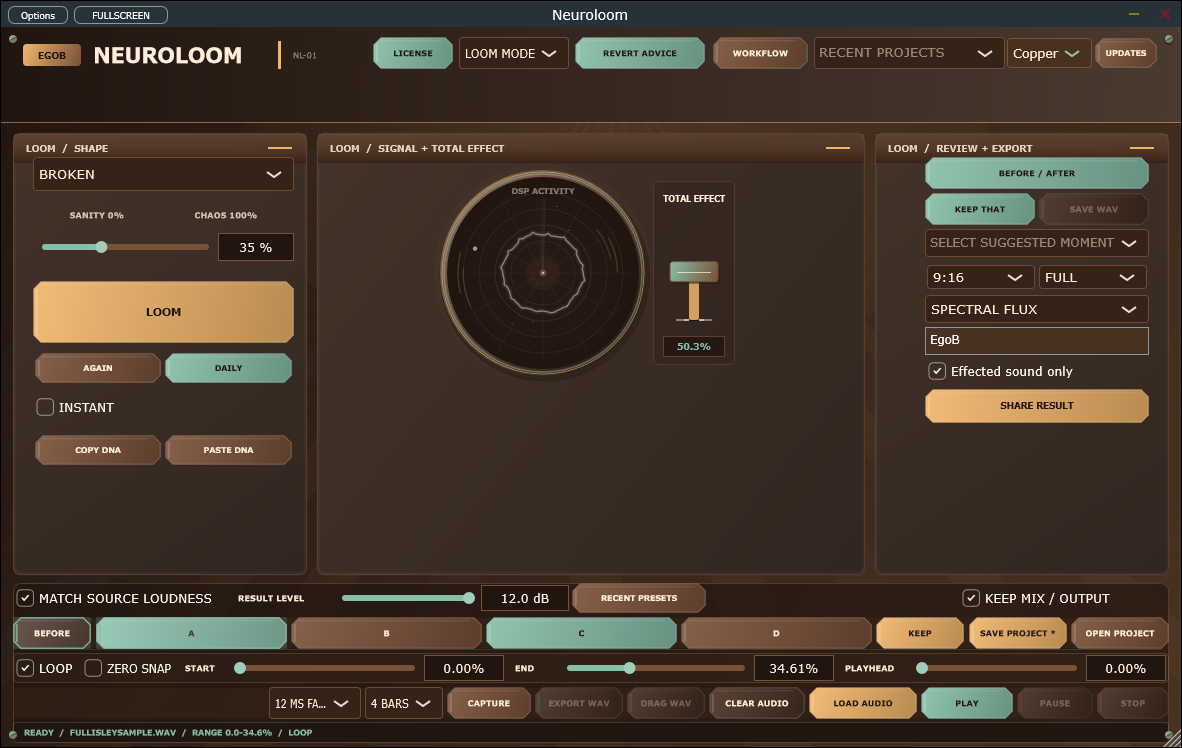
Use the Standalone LOOM workflow
- Load a supported audio file and let the decoded-memory preflight finish.
- Set START/END on the source timeline and choose LOOP or ONE-SHOT. Play, pause, stop and seek use the selected 5/12/20/30 ms fade.
- Switch to Loom and select a shape: variation A is heard immediately. Named shapes have distinct effect recipes; ??? keeps the free mutation behavior. Adjust Sanity/Chaos, press LOOM to apply that intensity, then audition A-D. Shape comparisons retain the same starting sound and respect locked controls and Total Effect.
- Use Keep to retain a result or Again for another variation. Suggested moments are measured source regions; audition them before deciding to use one.
- Save a
.neuroloomprojectto retain exact LOOM variants, source reference, range and export choices. If a source moves, use relink when reopening it.
The current project format writes schema 3 and reads schemas 1–3. The two autosave generations support crash recovery; explicit project saves remain the way to keep named work. A second Standalone launch focuses the existing window rather than starting another recovery owner.
Capture and export
Use the capture/Keep controls for a bar-aligned result, or export/drag the selected range as WAV. Keep the range and LOOP/ONE-SHOT choice intentional: audition, capture, suggested moments and export share that range.
For creator video, choose 9:16, 1:1 or 16:9 and a Loom Rings, Spectral Flux or Vector Bloom profile. Enter an optional Producer / artist name to show it in the video, cover and preview. Check Effected sound only to export just the processed sound; leave it unchecked for before followed by after. The name and checkbox are saved in projects and host state.
15 SEC and 30 SEC are exact total lengths for both video and WAV. Availability follows the loaded sample, or the selected moment when a range is selected. Below 15 seconds, only FULL is enabled; from 15 to under 30 seconds, 15 SEC and FULL are enabled; at 30 seconds or longer, all three are enabled. A 15-second moment therefore enables 15 SEC and FULL, even inside an eight-minute song. Choosing a suggested moment selects its range for playback and export. Choose FULL SAMPLE / ALL MOMENTS in the moment menu to restore the whole sample and browse all suggestions again. An unavailable saved duration switches to FULL.
Fixed durations render the loaded audio from the start of the selected moment using the current effect settings. No kept capture is required. A short kept capture cannot restrict a loaded sample. Without a loaded sample, export uses the available kept audio instead. Audio never repeats to fill an export; a before/after video gives each section half the selected total duration.
FULL renders the whole loaded song with the current effect settings, regardless of the selected moment or timeline range. With before/after enabled, it includes the whole original song followed by the whole processed song. Without a loaded song, FULL exports the complete kept capture. It has no three-minute cutoff; exports that exceed memory or disk limits report an error.
During export, the moving EXPORTING - PLEASE WAIT bar stays visible until the job finishes. Use its CANCEL button to stop; the indicator remains visible while cancellation completes. Wait for the completion message before opening the result files.
Open preview.html alongside its exported WAV and press Play. Local-file playback uses the browser's native audio controls; the visuals follow analysis saved with the export and stay synchronized when seeking. Re-export older packages to receive the corrected preview.
Export is an owned background job. The setup advisor can report missing encoder support, insufficient destination space or source-size limits.
Troubleshooting and performance
- No sound: check host/Standalone playback, the loaded source/range and output device.
- Unexpected preset result: select the intended preset, inspect locks, and compare A/B before changing several macros at once.
- Choppy graphics: lower visual quality. AUTO/HIGH/MEDIUM/LOW changes painting, not audio quality or DSP parameters.
- Source/export refused: read the preflight/job message and advisor guidance. The advisor does not change your DAW or audio settings automatically.
If playback crackles, increase your audio buffer and reduce the number of active effects or plug-in instances. For help, send your OS, DAW, NeuroLoom version and audio-buffer settings to info@egob.be.
Enter values and understand the bottom controls
Drag the Sanity/Chaos slider or click its percentage box and type a value. Arrow keys make small changes; double-click the slider to return to 35%. The four Studio macros have their own aligned row with room for 100.0%.
The bottom START and END sliders choose the part of the source to play and capture. Their values are percentages of the entire file. PLAYHEAD shows the current position; drag it or enter a value to seek. These fields do not change the sound character. LOOP repeats the selected region.
Match the source level
MATCH SOURCE LOUDNESS starts checked. It follows the original input's average signal level during audition, independently of a preset's input and output gain. Matching settles smoothly over the first few seconds. Capture then matches the measured source range RMS more precisely, without counting the appended effect tail as extra silence to normalize. Matching is bounded to prevent extreme boosts. Very quiet or very dynamic material may not reach exactly the same perceived loudness. This is RMS matching, not LUFS analysis.
Use RESULT LEVEL for the final manual adjustment: 0 dB is the matched level, -6 dB is quieter, and positive values are louder. The adjustment stays after matching and is saved in presets/projects. Capture again after changing it. Clear the matching checkbox to use the effect's own level plus your trim. The older Studio LEVEL mode is disabled while source matching takes precedence.
WAV and drag exports retain the captured level instead of applying a fixed -14 dB RMS target. Export reduces gain only when needed for the -1 dBFS sample peak ceiling, so peak protection can make very dynamic results quieter.
Interface appearance
Use the Theme selector near the top of the window to choose Original, Graphite (charcoal panels and teal accents), or Copper (warm brown panels and amber accents). The choice is remembered for this app on this computer. It changes only the interface; audio, saved projects, and rendered visual colours keep their existing settings.
Showcase preset bank
The SHOWCASE filter contains ten flagship factory sounds. They are appended as host programs 15–24 (zero-based); the original fifteen program numbers and favourite IDs stay stable.
Select SHOWCASE in the Studio preset browser, then load a sound. All 24
detailed controls, Auto Level, HQ quality, and all four performance macros
recall explicitly. Damage, Fracture, Space, and Motion start at 0%.
The parent values are the supplied neuroloom.txt recommendations; the
acceptance fixture in Tests/ShowcasePresetChecks.h checks all of them after
both minimum and maximum previous parameter states.
The browser supports the new Tonal/Vocal categories and every supplied tag. Search also finds best source, intensity, bank name, and related variation names. Searching GHOST BREAK, for example, finds BREAK MY DRUMS. The preset tooltip shows the complete metadata and related names. Intensity is descriptive metadata on a 0–100 scale, not an audio control.
| Preset | Category | Tags | Best source | Intensity | Auto Level |
|---|---|---|---|---|---|
| BREAK MY DRUMS | Rhythmic | glitch, drums, fracture | drums | 65 | LIGHT |
| 128TH PANIC | Destroy | microedit, extreme, chaos | drums | 95 | STRONG |
| PREPARED NIGHTMARE | Resonant | piano, metallic, ghost | piano | 70 | LIGHT |
| GLASS PIANO | Tonal | glass, bells, bright | piano | 55 | LIGHT |
| GHOST SPEAK | Vocal | reverse, dark, spectral | vocal | 65 | LIGHT |
| ANDROID | Vocal | robot, ring, metallic | vocal | 70 | LIGHT |
| METAL STRINGS | Resonant | guitar, metallic, body | guitar | 60 | LIGHT |
| BROKEN AMP | Destroy | guitar, crushed, fold | guitar | 80 | LIGHT |
| EMPTY SPACE | Ambient | huge, slow, dark | pad/string | 40 | LIGHT |
| MEMORY CORRUPT | Experimental | spectral, reverse, unstable | anything | 70 | LIGHT |
Named LOOM variations
Loading any parent below prepares four exact LOOM choices while keeping the parent audible. Switch to Loom and choose the labelled A/B button, then KEEP. BEFORE restores the supplied parent values. Remaining slots hold bounded variations generated from a fixed seed; all four macros remain zero. The same choices are also available through Studio's existing four variation buttons. Recalling the parent rebuilds the same choices.
These ten names are related variations, not extra factory programs. The attachment specified their parent/name relationships but no parameter values. The following authored overrides define their sounds; every omitted value inherits the exact parent. Values use the processor's plain units: percent for mix/amount controls, Hz for frequencies/rate, milliseconds for delay time, dB for output, and zero-based division choices (0 = 1/4, 1 = 1/8, 2 = 1/16, 3 = 1/32, 4 = 1/64, 5 = 1/128).
| Parent | LOOM slot | Variation | Authored overrides |
|---|---|---|---|
| BREAK MY DRUMS | A | GHOST BREAK | glitch 48; reverse 64; delay 28; delayTime 220; spectralWave 32; spark 38; mix 60 |
| BREAK MY DRUMS | B | DRUM MACHINE DYING | drive 38; crush 32; reduce 6; glitch 76; division 4; chaos 48; fold 30; spark 68; output -4 |
| PREPARED NIGHTMARE | A | BROKEN RHODES | drive 20; crush 14; ringFreq 240; resFreq 660; glitch 38; reverse 42; tone 5200; fold 18 |
| PREPARED NIGHTMARE | B | APHEX ATTIC | ring 20; resFreq 1100; glitch 46; division 3; reverse 65; chaos 38; delayTime 340; spectralWave 48 |
| GHOST SPEAK | A | VOICE SHREDDER | glitch 68; division 4; reverse 58; chaos 38; delay 38; spectralWave 62; spark 28; output -5 |
| GHOST SPEAK | B | TRANSMISSION LOST | crush 20; reduce 4; ring 24; ringFreq 95; reverse 80; delay 60; delayTime 610; tone 3200; chaos 42 |
| METAL STRINGS | A | GUITAR ERROR | crush 18; reduce 3; glitch 48; division 3; reverse 32; chaos 32; fold 36; output -5 |
| METAL STRINGS | B | STRING MACHINE | ring 12; resonance 82; resFreq 1480; resDecay 84; glitch 10; delay 40; delayTime 360; dimension 68; fold 10 |
| EMPTY SPACE | A | FLOAT | ring 0; resonance 14; glitch 3; reverse 28; delay 74; delayTime 820; feedback 68; spectralWave 48; spectralRate 0.04; dimension 88; mix 48 |
| MEMORY CORRUPT | A | DREAM DECAY | drive 10; crush 10; reduce 3; resDecay 86; glitch 30; reverse 72; chaos 42; delay 66; delayTime 620; feedback 70; spectralRate 0.12; dimension 82; fold 16 |
Exact variant payloads and names survive Keep, offline DNA, host state,
project save/open, and project recovery through the existing LOOM state
serialization. No LOOM/project/DNA schema change is needed: the optional
loomVariantName property travels with each exact parameter tree.
DNA import retains the existing parent-lineage behavior.
LOOM, AGAIN, and Daily Loom continue to generate new choices from the current sound and selected personality/seed/locks. Generated choices clear authored names so a newly generated sound cannot be mislabelled GHOST BREAK. Saving a user preset retains the current sound, zero macros, category, tags, best-source and intensity metadata; projects and DNA retain the full A–D set.
These settings implement the proposed sound designs. Automated recall and audio safety checks do not establish subjective listening quality.
Validation
Windows x64 Release standalone and VST3 builds succeeded. The full 20-test CTest suite passed; all seven checks affected by the final footer layout change also passed after rebuilding. The UI fixture checks named variation selection, Keep, source/intensity metadata, category/tag discovery, and non-overlapping footer controls at the 1100 px layout.
The callback report covers all 25 factory programs across five sample rates: 135 release-gated scenarios pass with zero callback allocations. Its separate 16-instance diagnostic remains outside the certified eight-instance ceiling and fails, as explicitly reported by the existing gate. The allocation matrix also exercises every prepared showcase A–D state across five rates, six block sizes, and mono/stereo layouts.
Workflow tools
Find a starting point
Open WORKFLOW > Discover / Protect. Choose a manual source (Vocal, Guitar, Drums, Bass, Pad or Full mix), purpose (Warmth, Width, Motion, Texture or Destruction), and intensity (Subtle 0–30, Character 31–65, Extreme 66–100). Each filter also offers Unknown; All removes that filter. These combine with the existing bank/category, tags, search and favorites. Filtering does not audition a sound. Choose the result in the Studio preset browser, then use the existing Keep/Revert controls. This is manual metadata discovery in VST3 and standalone; it does not classify live DAW input.
The Everyday bank appends programs 25–36; all previous program numbers and recipes stay unchanged. Twelve starting points cover two treatments per source:
| Source | Starting points | Purposes |
|---|---|---|
| Vocal | Soft warmth; Air and width | Warmth; Width |
| Guitar | Rounded edge; Moving halo | Warmth; Motion |
| Drums | Light grain; Parallel bite | Texture; Destruction |
| Bass | Soft harmonics; Worn edge | Warmth; Texture |
| Pad | Slow drift; Open sides | Motion; Width |
| Full mix | Gentle colour; Small width | Warmth; Width |
Each has an explanation and zero macros. Use source loudness matching and KEEP MIX / OUTPUT for comparison. These are engineering starting points pending recorded-source listening and level-match acceptance, not a listening-certified bank or a promise of low-band/transient protection.
Protect controls
The same page exposes group locks and Vary only focus:
| Group | Included parameter IDs |
|---|---|
| Pitch Controls | ring, ringFreq, resonance, resFreq, resDecay |
| Rhythmic Controls | glitch, division, reverse, spectralWave, spectralRate, chaos |
| Space | delay, delayTime, feedback, dimension |
Individual locks combine with groups. Unlocking a group leaves individual locks set. Focus protects all other detailed controls during mutation, LOOM generation and macros. Preset selection still loads the chosen preset as before. A protected control retains its value; this is not a whole-chain perceptual guarantee. Undo/redo, project/preset snapshots and host state retain the protection state.
Enhance, tuning and explanations
Choose ENHANCE in the LOOM shape menu. Zero amount recalls the exact baseline; amount scales continuous changes of at most 8% of a parameter's normalized range at 100%, and 0.8% at 10%. Only drive, tone, dimension, spectralWave and delay are candidates. Locks are respected; mix, output and frequency/time tuning are kept. Existing named shapes and their Sanity/Chaos behavior are unchanged. The seed and baseline reproduce the result; whether it improves a source is a listening decision.
In Studio mode, double-click a resonator/ring frequency value to enter 440 Hz, A4, C#3,
Bb3 or A4 +12.5c. Middle C is C4 and A4 is 440 Hz. Existing parameter ranges
and frequency increments apply; invalid/out-of-range input leaves tuning alone.
WORKFLOW > Changes / Tuning switches frequency display to notes and cents.
Display choice is local to the editor; host automation and saved sound remain Hz.
No key detection or scale snapping is implied.
That page also compares the actual current controls with the LOOM Before snapshot. Tone, Rhythm and Space show their four largest normalized changes, with plain before/after values. Restore buttons copy only that group's unlocked controls from Before. Input, mix, output and clock mode are outside these restore groups. Undo/redo and Keep retain the restored result. Explanations describe control changes, not perceived sound quality or macro-adjusted internal DSP values.
Musical delay timing
Open WORKFLOW > Delay / Tempo. Milliseconds uses the existing 5–900 ms Delay Time parameter. Sync offers 1/64 through 1/2 straight, dotted and triplet. VST3 uses host BPM (120 when none is supplied); standalone uses an editable 30–300 BPM parameter. Both new parameters support automation and state recall.
The existing 2.1-second allocation and 1.8-second maximum tap are unchanged. Choices requiring more than 1.8 seconds are disabled at the current tempo. If automation selects an unsupported division or the host supplies invalid/out-of- range BPM, delay wet fades out; other effects continue. It returns when supported. The panel shows resolved milliseconds or an unsupported-clock/division message. For example, quarter notes at 120 BPM are 500 ms, dotted quarters 750 ms and quarter triplets 333.33 ms. A dotted half at 60 BPM is unsupported (3 seconds).
Tempo changes use the existing dual-tap transition and queued target policy. The target time follows BPM; the audible tap crossfades over the existing transition window rather than jumping or claiming instantaneous phase alignment. See transition policy.
Software updates
Use Updates beside the interface theme to check for a newer version. Daily background checks can be disabled; your choice is remembered. Checks use HTTPS and send no licence, project, audio or MIDI data. Opening the official download page requires your action. Installers are never downloaded or installed automatically.