Sampling · Practical production guide
Turn a recording into playable sample chops.
An automatic sample chopper divides a recording into pieces you can trigger with MIDI. The useful part is getting from a long source to a small set of playable sounds quickly, while keeping control over where each slice begins and ends.
CrateGhost · Coming soon · Workflow preview; purchases and new downloads are not open yet.
Choose a chopping method that fits the recording
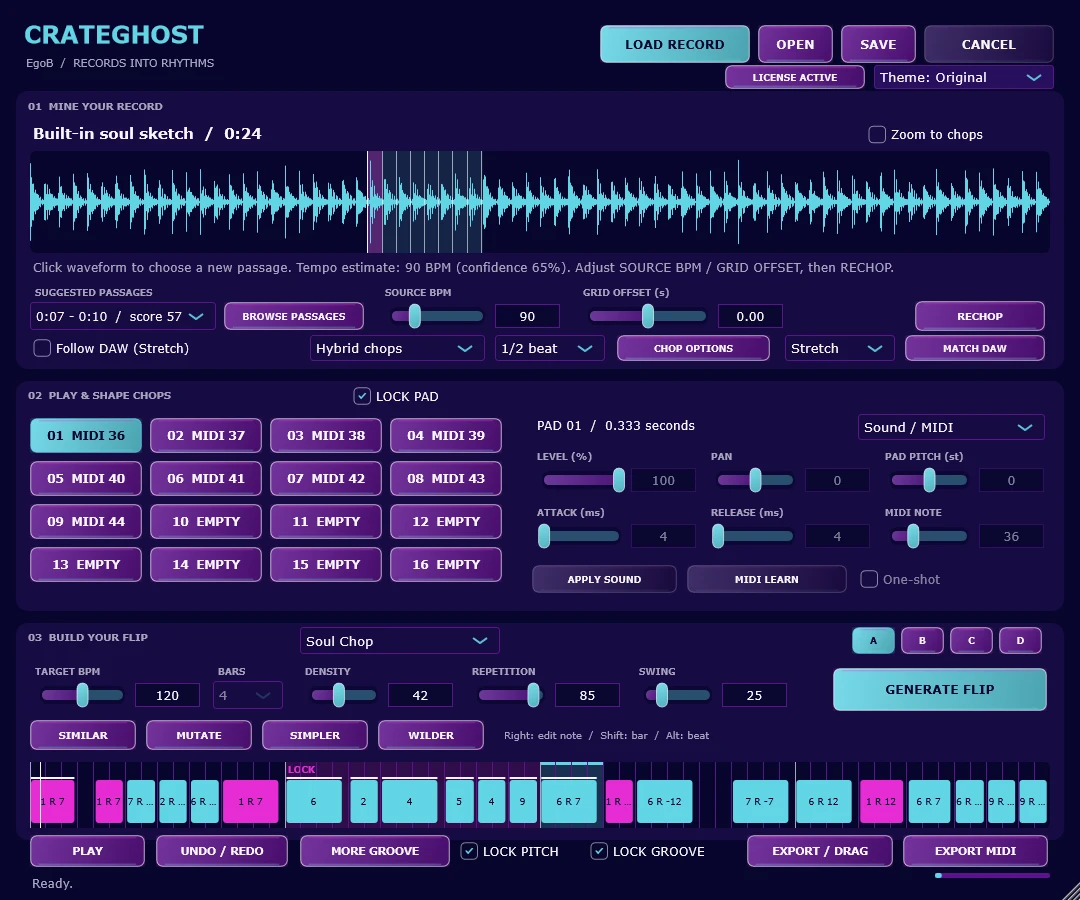
Even cuts work well on a steady loop. A loose performance needs more attention to the attacks and phrase endings. In CrateGhost, Grid cuts at a beat division; Transient follows detected attacks; Hybrid starts with a grid and moves nearby boundaries toward attacks. Phrase looks for longer musical boundaries. These are starting points to audition, not finished musical decisions.
From source file to instrument track
- Load a WAV, AIFF, FLAC or MP3 recording with LOAD RECORD. Choose a suggested passage and listen to its pads.
- Correct SOURCE BPM and GRID OFFSET if the grid misses the beat. Choose a mode and division, then press RECHOP.
- Check each pad for a clipped attack, an unwanted tail or a slice that is too long. Adjust its trim before building a pattern.
- Load the VST3 on an instrument track and trigger pads with MIDI, or use the standalone player. Choose a style and press GENERATE FLIP to hear a pattern.
- Save the project. Use EXPORT / DRAG for a rendered flip, MIDI, individual chops or a chop kit.
Keep pitch and timing decisions separate
CrateGhost offers Tape and Stretch modes. Tape links speed and pitch; Stretch fits chops from source tempo to target tempo independently of pitch. Correct the source grid first. When sending an exported MIDI pattern back to CrateGhost, stop its internal player and leave Follow DAW off so the pattern plays only once.
Automatic chopping cannot decide which phrase belongs in your track. Start with a few strong pads, play a simple rhythm, then add variation. If the source is still too busy, choosing a different passage often helps more than adding extra slices.
Common questions
Is this an audio effect or a sampler instrument?
CrateGhost is a VST3 instrument with MIDI-triggered pads, plus a standalone app. Put the plugin on an instrument track.
Is CrateGhost available now?
It is a coming-soon development preview. Purchases and new downloads are not open yet; the public guide documents the current workflow.
Explore this workflow with CrateGhost.
Preview CrateGhost: turn a recording into playable chops and editable sample flips. Windows and Apple-silicon macOS standalone app and VST3 instrument. Coming soon.