Sampling · Practical production guide
Build a boom bap flip around a few strong chops.
A useful boom bap sampling workflow makes it easy to repeat a motif, leave space for drums and change just enough to keep the loop moving. Begin with the phrasing of the sample, then shape the groove around it.
CrateGhost · Coming soon · Workflow preview; purchases and new downloads are not open yet.
Start with a short musical idea
Pick a passage with a clear character and audition its slices individually. Keep one longer chop that carries the harmony and a few shorter pieces for answers or accents. If every hit is equally busy, shorten or remove events before adding effects.
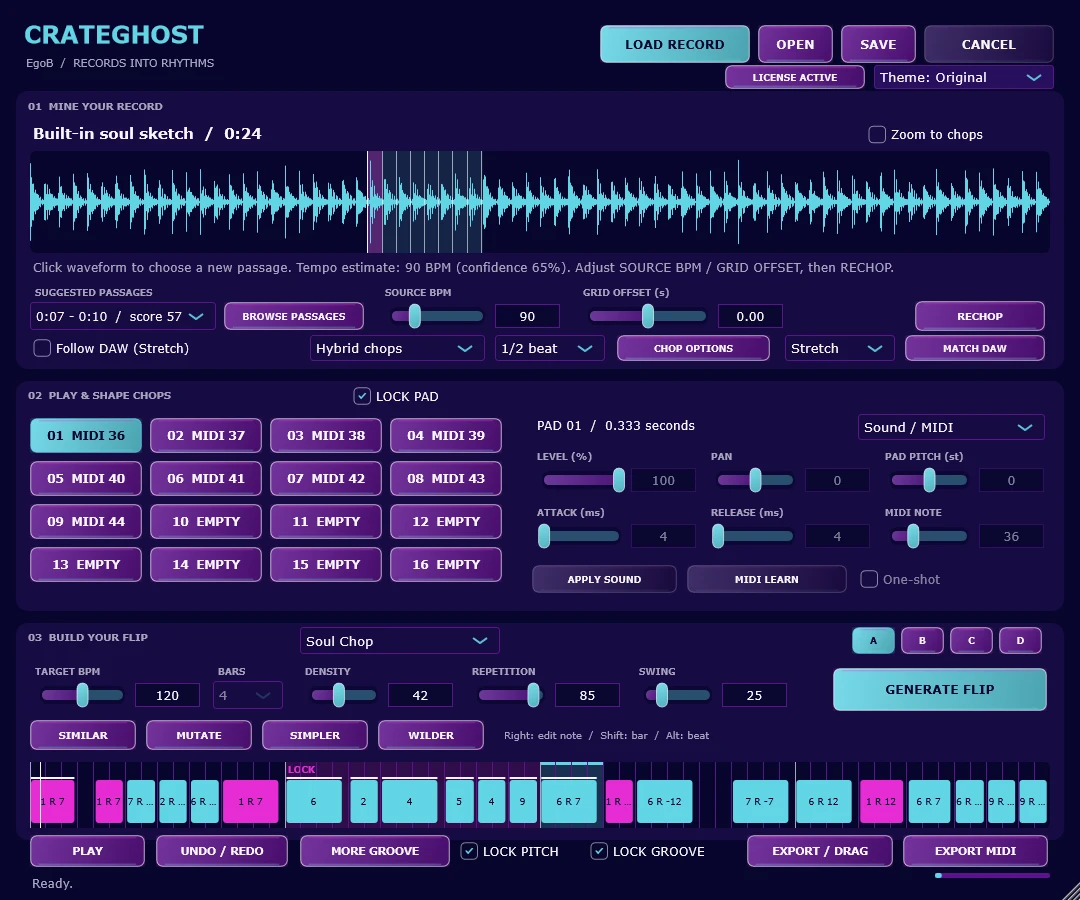
In CrateGhost, the Classic Boom Bap style gives you a starting point. Selecting a style sets controls but does not regenerate the existing pattern by itself. That lets you prepare a change before deciding to hear a new flip.
Make a first flip, then protect the hook
- Load a recording, choose a passage and review its chop boundaries. Set a target tempo that leaves room for the sample.
- Select Classic Boom Bap, choose four bars and press GENERATE FLIP, then PLAY.
- Open MORE GROOVE to explore swing, timing feel, velocity and gate variation. Choose a groove base, press APPLY SETTINGS, then generate to hear it.
- Lock a note, beat or bar that carries the hook. Use SIMILAR for a close variation or MUTATE to explore more changes in unlocked material.
- Compare A/B/C/D slots and keep the strongest version. Save the project, then export audio or MIDI for your arrangement.
Make the drums and sample agree
Compare the chop rhythm against a simple kick and snare before programming a busy hat part. Swing changes the spacing between subdivisions; humanization introduces timing and velocity variation. Neither needs to be extreme to make the loop breathe.
If a new groove changes too much, return to the saved slot or lock the part that worked. CrateGhost’s LOCK GROOVE protects note starts and gates while allowing sound edits. For a separate drum-pattern workflow, GrooveForge provides editable MIDI, swing and microtiming controls.
Common questions
Does choosing a groove base immediately change the current flip?
The base sets the controls. Apply the settings and generate a new flip to hear the result; existing locks protect retained material.
Can I continue arranging in my DAW?
Yes. The documented export workflow includes rendered WAV and MIDI, as well as individual chops and chop kits. MIDI needs an instrument and matching pad mapping to reproduce the sounds.
Explore this workflow with CrateGhost.
Preview CrateGhost: turn a recording into playable chops and editable sample flips. Windows and Apple-silicon macOS standalone app and VST3 instrument. Coming soon.