Find your chops
Use Find Gold and WHY THIS to review passage roles and scoring evidence. Open Advanced for Hybrid, Grid, Transient or Phrase chopping, source tempo and pad trims.
CrateGhost · Available now
Find a passage. Make it your own.
Chop recordings into playable samples with CrateGhost. Try the sample chopping VST3, standalone app and Mac AU free for 14 days on Windows or Apple silicon Mac.
Launch price: €49
Regular price planned at €79.
Windows x64 v1.5.10 / macOS 14+ arm64 v1.5.10
Secure checkout through Lemon Squeezy; final amount is shown at checkout. Includes Windows and Apple-silicon Mac packages and your license key. Online activation and a connection at least every 30 days are required.
Already purchased? Find your downloads →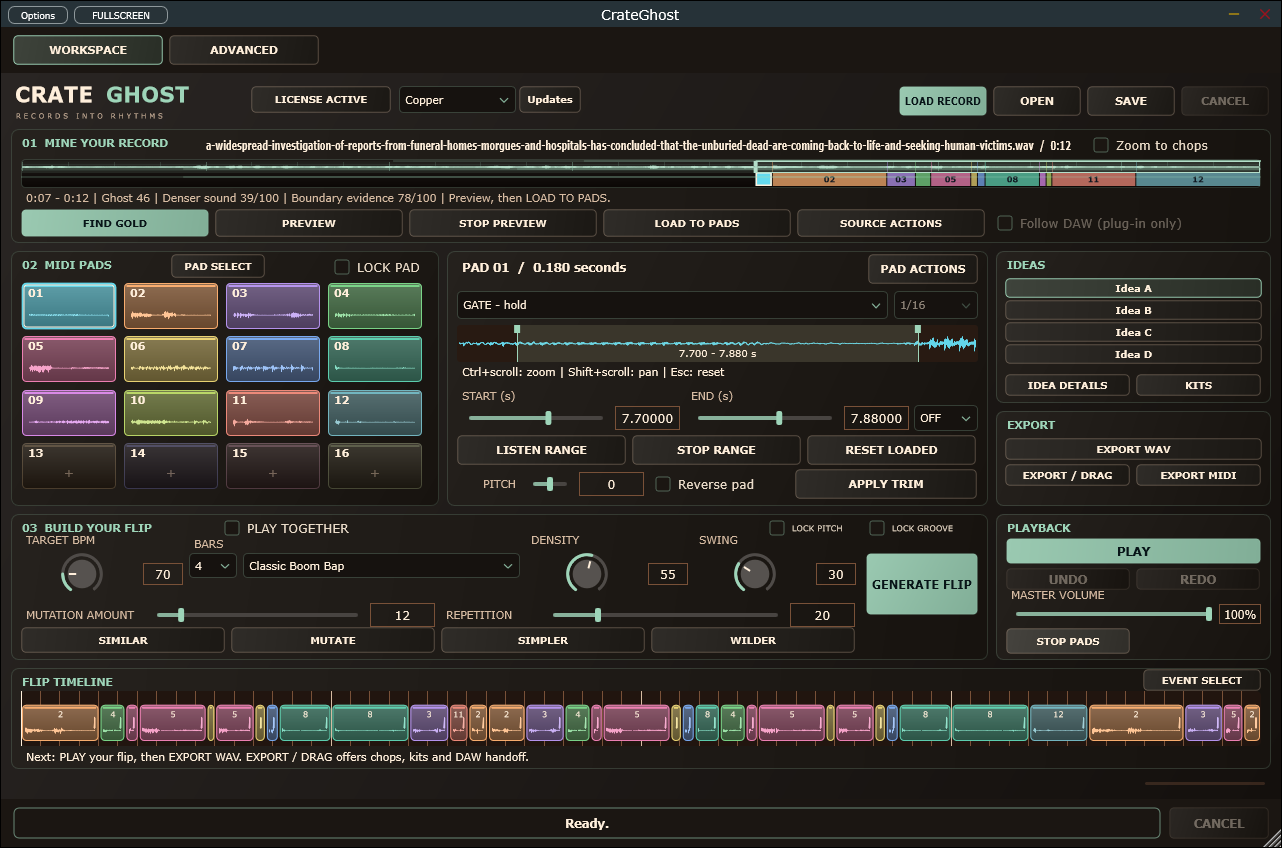
From idea to output
Load a recording, use Find Gold to compare role-based passage suggestions, then load your choice to the pads. Play the pads, generate a pattern, then lock the parts you like while exploring variations. Save your project and export WAV or MIDI.
Use Find Gold and WHY THIS to review passage roles and scoring evidence. Open Advanced for Hybrid, Grid, Transient or Phrase chopping, source tempo and pad trims.
Explore eight styles, lock notes or bars, and compare patterns in A/B/C/D slots.
Trigger pads with MIDI, edit the generated pattern, then save a project or export WAV and MIDI.
| Requirement | Windows | macOS |
|---|---|---|
| Current version | 1.5.10 | 1.5.10 |
| VST3 | Yes | Yes |
| Audio Unit (Logic Pro) | — | Yes |
| Standalone | Yes | Yes |
| Processor | x64 | Apple silicon (arm64) |
| Minimum OS | Not specified | macOS 14.0 |
| Installer signing | Yes | Developer ID |
| Apple notarization | — | Yes |
Intel Macs are not supported. See the installation guide for feature differences and host requirements.
Apple silicon (arm64), macOS 14 or newer. The PKG is Developer ID signed, notarized and stapled. Intel Macs are not supported.
The Apple-silicon installer includes the standalone app, VST3 and AU instruments. The current release includes the compact workflow, role-aware Find Gold, scoring preset import/export and WHY THIS evidence. EXPORT / DRAG supports rendered flips, MIDI, individual chops and chop kits. Playback and WAV/MIDI export are available during the full-feature 14-day trial. Activate a purchased CrateGhost key to continue after the trial. Live receipt-key acceptance and third-party DAW qualification remain untested in this website audit. The current Mac PKG includes the standalone app, VST3 and Audio Unit for Logic Pro. Open the signed, notarized installer, then restart the DAW. The plug-ins install for the current logged-in Mac user in ~/Library/Audio/Plug-Ins. Restart and rescan your DAW in that account; check the new per-user plug-ins before removing older system-wide copies. See the product guide for the correct plug-in slot.
Yes. CrateGhost is available for Windows and Apple-silicon Mac. Download the free 14-day trial, then activate the same installation with your purchased key.
CrateGhost is an instrument. Load it on an instrument track and play its pads with MIDI. The standalone app also provides internal playback.
The demo is an original synthetic sketch. Load your own recordings for sample flips; the app does not include commercial records.
Installation, controls and troubleshooting: CrateGhost user guide →
For help with your setup, email info@egob.be with your OS version, processor architecture and DAW.
NeuroLoom GrooveForge EgoVisual Nylonize SignalProof CueFrame
Back to all plugins →The Windows and Mac installers include a full-feature 14-day trial. Activate your purchased CrateGhost key during or after the trial to unlock the same installation. No reinstall or separate paid installer is required.
Buy CrateGhost · €49. Existing customers can use their private purchase download link.
GHOSTKEYS + CRATEGHOST
Get the free MIDI controller, connect your setup and make a first flip with an original source sample.
Start the phone-to-sample walkthrough →GHOSTKEYS + CRATEGHOST
Use GhostKeys on Android as a Bluetooth MIDI controller for CrateGhost standalone on Windows. Set up GhostKeys Windows Bridge and loopMIDI, then enable the same loopMIDI input in CrateGhost.
Android to Windows setup guide →Start with your next session
Sampling
Learn how automatic sample chopping works: choose grid, transient or phrase slices, fix boundaries and play pads. Explore the CrateGhost VST3 workflow.
Read the workflow →Sampling
Find usable passages inside recordings, audition sparse sections and turn a promising phrase into pads. A practical sample-discovery guide with CrateGhost.
Read the workflow →Sampling
Build a boom bap sample flip with playable chops, swing, note locks and A/B variations. Follow the documented CrateGhost sampling-plugin workflow.
Read the workflow →