Make the sound visible
Build reactive scenes that respond to your music and shape how the visual movement follows a track.
EgoVisual · Coming soon
Let your music move the picture.
Explore EgoVisual for audio reactive visuals, Auto Director scenes and music-video export on Windows. Standalone and VST3 workflows. Coming soon.
Launch price on release: €59
Windows x64 v11.2.1 / macOS 14+ arm64 v11.2.1
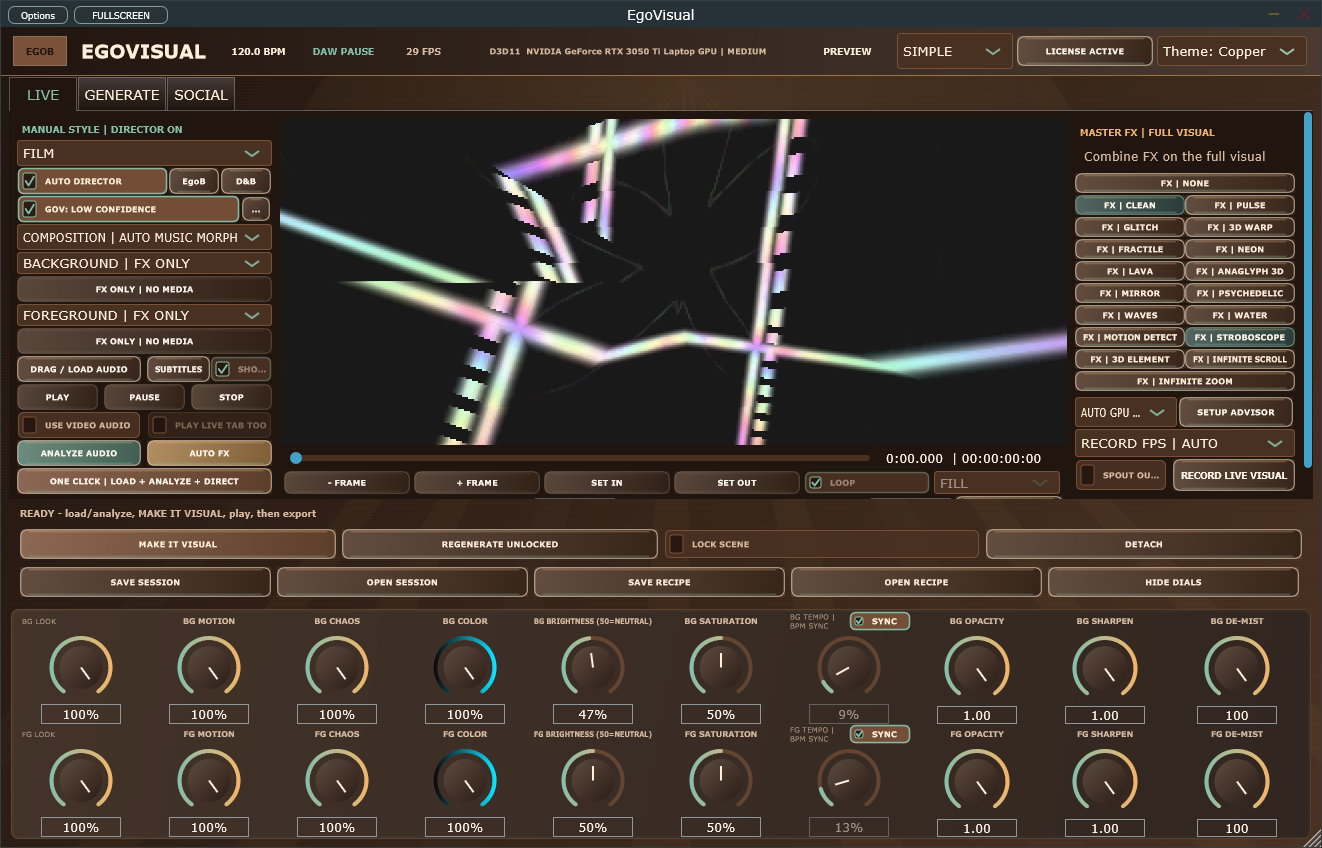
From idea to output
Load a song in the standalone app, analyze its structure and shape a visual sequence with Auto Director. Compare takes in Creator Studio and export a video. The VST3 provides a separate in-DAW workflow; consult the guide for its host restrictions.
Build reactive scenes that respond to your music and shape how the visual movement follows a track.
Use Auto Director, Infinite Scroll and Infinite Zoom to develop a longer sequence. Composer picture, hit-point and timing tools are now in the separate CueFrame app.
Export branded content packs and portable sessions, or use the standalone video workflow for your finished music visual.
| Requirement | Windows | macOS |
|---|---|---|
| Current version | 11.2.1 | 11.2.1 |
| VST3 | Yes | Yes |
| Audio Unit (Logic Pro) | — | Yes |
| Standalone | Yes | Yes |
| Processor | x64 | Apple silicon (arm64) |
| Minimum OS | Not specified | macOS 14.0 |
| Installer signing | Yes | Developer ID |
| Apple notarization | — | Yes |
Intel Macs are not supported. See the installation guide for feature differences and host requirements.
Apple silicon (arm64), macOS 14 or newer. The PKG is Developer ID signed, notarized and stapled. Intel Macs are not supported.
Apple silicon, macOS 14 or newer. Reduced VJ preview with audio-driven scenes. CueFrame is the separate composer app. No bundled sound bank or Mac video export. Use standalone for the documented workflow; plug-in picture/video features require host-specific qualification.
A visualizer plugin runs inside a compatible DAW and uses the music to drive images. EgoVisual also has a standalone app for track analysis, scene creation and export.
No. The current VST3 host policy restricts some modes and video decoding needs matching local certification. Check the guide and test your intended host workflow; use the standalone app for the documented full video workflow.
Video export is available in the Windows standalone app. The reduced Mac preview does not include video export. Let the export finish and finalize before opening the output file. The guide covers video, subtitles and output settings.
Installation, controls and troubleshooting: EgoVisual user guide →
For help with your setup, email info@egob.be with your OS version, processor architecture and DAW.
NeuroLoom GrooveForge Nylonize SignalProof CrateGhost CueFrame
Back to all plugins →The Windows and Mac installers include a full-feature 14-day trial. Activate your purchased EgoVisual key during or after the trial to unlock the same installation. No reinstall or separate paid installer is required.
New purchases and public trial downloads are coming soon.
Start with your next session
Music visuals
Learn the EgoVisual VST3 master-bus workflow for audio reactive visuals, host transport and response controls, plus when to use the standalone exporter.
Read the workflow →Music visuals
Turn a song into a music-aware visual sequence with EgoVisual: analyze audio, generate scenes, refine the arrangement and export video on Windows.
Read the workflow →Music visuals
Plan a full-track visualizer and short release clips with EgoVisual. Compare DAW preview and standalone workflows, keep a consistent style and review exports.
Read the workflow →